 Firefox
 1 / 5
1 / 5About Faces Font
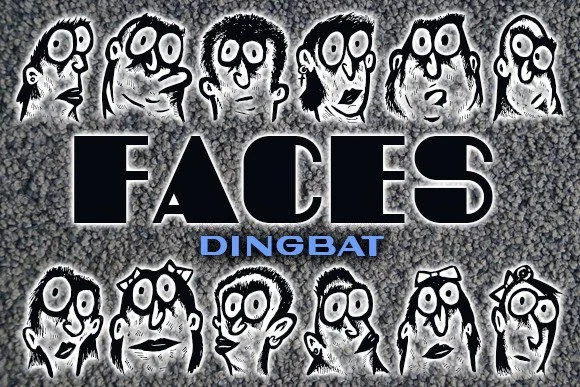
Faces brings an instant sense of playful charm to any project that needs personality or visual depth. Created by vladimirnikolic, this dingbat font is constructed entirely from hand-drawn character faces with a distinct cartoon sensibility that jumps off the page. Instead of traditional letters and numbers, you get expressive, smiling faces and playful expressions that feel genuinely lively and engaging when placed on your designs.
Hand-drawn faces like these work beautifully for wedding invitation suites where you want personality and genuine whimsy in the design, greeting card collections where character and emotion matter as much as words, DIY postcard projects with that beloved homemade feel, and scrapbooking layouts where visual texture and personality add real depth. It translates equally well to printed materials or web-based work. Comprehensive character coverage means you can construct a complete visual story without layering multiple font families, keeping your overall design focused and cohesive.
Pair Faces with a crisp geometric sans-serif for any supporting text or body copy, which keeps the focus squarely on these expressive dingbat characters as your design's visual centerpiece. Find it on Creative Fabrica to start bringing this playful, quirky personality to your next project.
Style & Use Cases
- Overall Style
- Iconographic, Faces
- Use Case
- Icons, Accents
- Ideal For
- ornaments, bullets, and decorative flourishes
- Pairs With
- any text font
How to Install Faces Font
Step-by-step instructions for every platform
- 1Download the Faces font file (.ttf or .otf).
- 2Locate the downloaded file in your Downloads folder.
- 3Right-click the font file.
- 4Select "Install" to install for the current user, or "Install for all users" to make it available system-wide.
- 5Faces is now available in Word, Photoshop, Illustrator, and all other apps.
More by vladimirnikolic
View all →


Browse fonts by theme
Curated collections →Saw a font in a picture? Identify any font from an image with our free Font Finder.
More Dingbats Fonts
Browse all →







What pairs well with Faces Font?
Faces Font is a versatile dingbats font that works for both headings and body text. Pair it with a contrasting sans-serif or serif font to add visual interest and a clear distinction between titles and body copy.




Faces Font
Reviewed by the FontBoxDL team · Updated July 2026