 Firefox
 1 / 8
1 / 8About Emoticon Doodle Font
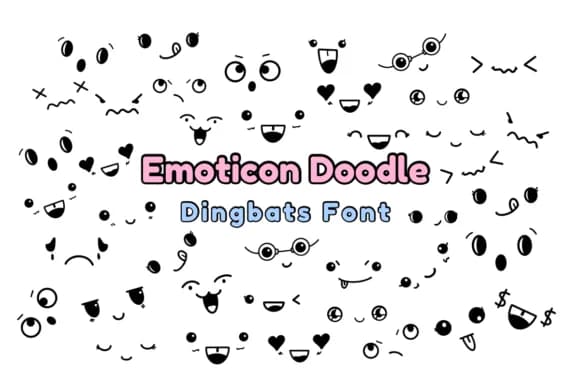
Emoticon Doodle by Nun Sukhwan brings together hand-sketched characters in a playful dingbats font collection. The letterforms have that organic, informal quality of pen on paper, complete with subtle variations that make each symbol feel authentically handmade. Rather than trying to be polished or perfect, these doodles embrace the spontaneity and warmth of quick sketching, giving them genuine character and personality that resonates with makers.
This typeface works especially well for craft-focused projects with a handmade aesthetic. You might use it for Valentine's Day sticker collections, teacher resource printables, kids' birthday invitations, DIY greeting card suites, or embellishment sets for scrapbooking. The sketchy character set also suits custom t-shirt designs where artisan details matter, and it adds charm to handmade product packaging for Etsy sellers looking to stand out from mass-produced alternatives. Its monochrome design keeps things flexible, working across both digital and print media without losing its handcrafted appeal.
Emoticon Doodle pairs well with any project where warmth and personality matter more than polish. Craft enthusiasts, small business owners, and makers will find plenty of applications for this charming font. Pick it up on Creative Fabrica to add this doodle sensibility to your next creative project.
Style & Use Cases
- Overall Style
- Iconographic, Dingbats Font
- Use Case
- Icons, Accents
- Ideal For
- ornaments, bullets, and decorative flourishes
- Pairs With
- any text font
How to Install Emoticon Doodle Font
Step-by-step instructions for every platform
- 1Download the Emoticon Doodle font file (.ttf or .otf).
- 2Locate the downloaded file in your Downloads folder.
- 3Right-click the font file.
- 4Select "Install" to install for the current user, or "Install for all users" to make it available system-wide.
- 5Emoticon Doodle is now available in Word, Photoshop, Illustrator, and all other apps.
More by Nun Sukhwan
View all →



Browse fonts by theme
Curated collections →Saw a font in a picture? Identify any font from an image with our free Font Finder.
More Dingbats Fonts
Browse all →







What pairs well with Emoticon Doodle Font?
Emoticon Doodle Font is a versatile dingbats font that works for both headings and body text. Pair it with a contrasting sans-serif or serif font to add visual interest and a clear distinction between titles and body copy.



Emoticon Doodle Font
by Nun Sukhwan
Reviewed by the FontBoxDL team · Updated July 2026