 Firefox
 1 / 8
1 / 8About Emoji Feelings Font
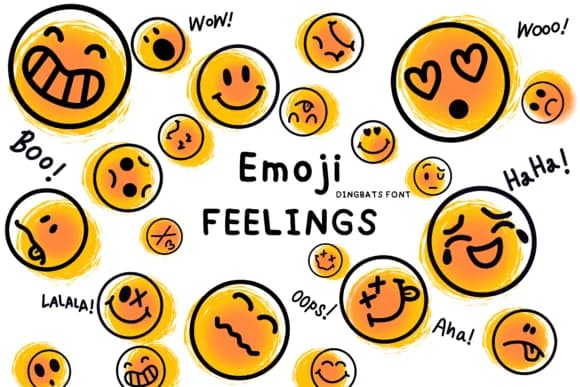
Emoji Feelings delivers a playful collection of hand-sketched expressions and cartoonish character symbols that feel genuinely drawn rather than machine-processed or generic. Designed by Bee Piyanuch, this dingbats font captures the loose, gestural quality of quick marker sketches, making it essential when you need something with real personality and warmth rather than sleek corporate precision. The font comes with outlined coloring variants, so you can fill each symbol however you want across Procreate, Affinity Designer, or any illustration tool in your workflow.
This works beautifully for hand-lettered greeting cards, DIY planner spreads, and custom journal embellishments where actual drawing skill might slow your creative process. Social media creators lean on it for quick mood graphics and emotional sticker designs, while scrapbooking templates come alive with its playful symbols that don't read as mass-produced. The sketchy, deliberately imperfect lines feel intentional rather than clumsy, which gives it real distinction in a category increasingly crowded with geometric and minimal dingbat sets.
This is the font for anyone building something that values approachability and human warmth over corporate polish. Grab it on Creative Fabrica whenever you need those small emotional moments in your work to land with genuine warmth rather than hollow, manufactured decoration.
Style & Use Cases
- Overall Style
- Iconographic, Fonts
- Use Case
- Icons, Accents
- Ideal For
- ornaments, bullets, and decorative flourishes
- Pairs With
- any text font
How to Install Emoji Feelings Font
Step-by-step instructions for every platform
- 1Download the Emoji Feelings font file (.ttf or .otf).
- 2Locate the downloaded file in your Downloads folder.
- 3Right-click the font file.
- 4Select "Install" to install for the current user, or "Install for all users" to make it available system-wide.
- 5Emoji Feelings is now available in Word, Photoshop, Illustrator, and all other apps.
More by Bee Piyanuch
View all →


Browse fonts by theme
Curated collections →Saw a font in a picture? Identify any font from an image with our free Font Finder.
More Dingbats Fonts
Browse all →







What pairs well with Emoji Feelings Font?
Emoji Feelings Font is a versatile dingbats font that works for both headings and body text. Pair it with a contrasting sans-serif or serif font to add visual interest and a clear distinction between titles and body copy.



Emoji Feelings Font
by Bee Piyanuch
Reviewed by the FontBoxDL team · Updated June 2026