 Firefox
 1 / 8
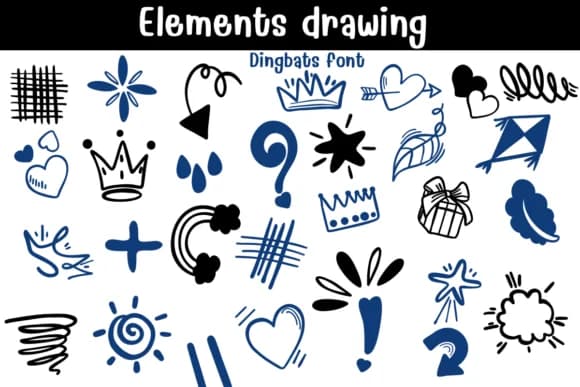
1 / 8About Elements Drawing Font
Elements Drawing by Sontaya is a hand-drawn dingbat collection brimming with playful symbols and abstract marks that feel authentically sketched rather than sterile and perfect. The set includes hearts, stars, crowns, arrows, question marks, scribbles, and quirky organic shapes that read like doodles scrawled across a notebook margin. Each character carries personality from the designer's pen-and-ink approach, giving your work the informal, approachable quality that only hand-made illustrations deliver.
You'll find these marks earning their place in scrapbooking layouts, where they fill gaps between photos and journaling text while building visual rhythm. Bullet journal spreads rely on them constantly for page breaks, mood markers, section dividers, and daily emphasis throughout the month. Hand-lettered wedding stationery gains real texture when you layer these symbols around your calligraphy and main typography. Social media story graphics come alive with quick accents that catch the viewer's eye without overwhelming your core message. Mood boards develop character when punctuated with these elements scattered throughout. Even presentation slides benefit from informal marks used as callout boxes, emphasis points, or subtle visual connectors.
Get Elements Drawing on Creative Fabrica and bring hand-drawn warmth to your next project.
Style & Use Cases
- Overall Style
- Iconographic, Diy
- Use Case
- Icons, Accents
- Ideal For
- ornaments, bullets, and decorative flourishes
- Pairs With
- any text font
How to Install Elements Drawing Font
Step-by-step instructions for every platform
- 1Download the Elements Drawing font file (.ttf or .otf).
- 2Locate the downloaded file in your Downloads folder.
- 3Right-click the font file.
- 4Select "Install" to install for the current user, or "Install for all users" to make it available system-wide.
- 5Elements Drawing is now available in Word, Photoshop, Illustrator, and all other apps.
Browse fonts by theme
Curated collections →Saw a font in a picture? Identify any font from an image with our free Font Finder.
More Dingbats Fonts
Browse all →







What pairs well with Elements Drawing Font?
Elements Drawing Font is a versatile dingbats font that works for both headings and body text. Pair it with a contrasting sans-serif or serif font to add visual interest and a clear distinction between titles and body copy.



Elements Drawing Font
by Sontaya
Reviewed by the FontBoxDL team · Updated June 2026