
 1 / 8
1 / 8About Element Doodle Font
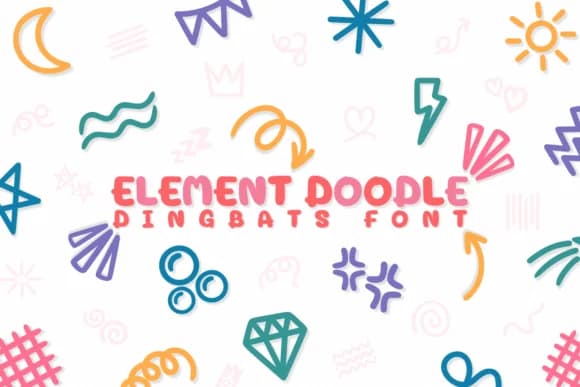
Element Doodle by Chonada is a playful dingbats collection of hand-drawn marks, arrows, and abstract shapes designed for layering into visual compositions. The font excels when you want personality and visual interest without leaning on photographs or bespoke illustration work that takes hours to produce. Each mark feels sketched rather than digital, which is why it pairs so naturally with hand-lettered typefaces, calligraphy, and brush scripts. The collection offers enough variety that you can build complete visual systems from just these elements.
You'll find it invaluable for scrapbooking spreads where you're combining paper, text, and embellishments into intricate but balanced layouts. Illustrators reach for these mark sets when creating decorative frames on printed wedding stationery, designing ornamental borders around hand-lettered invitations, and filling planner pages with gestural details that guide the eye. Small product brands use Element Doodle for patterned gift wrap, decorative labels on artisanal packaging, and hand-drawn gift tags that feel personal. Even a simple thank-you card gains warmth from a few well-placed marks.
The doodles feel organic without being overly detailed, so they adapt across different design styles and industries. Grab Element Doodle on Creative Fabrica and start layering these marks into your work.
Style & Use Cases
- Overall Style
- Iconographic, Element
- Use Case
- Icons, Accents
- Ideal For
- ornaments, bullets, and decorative flourishes
- Pairs With
- any text font
How to Install Element Doodle Font
Step-by-step instructions for every platform
- 1Download the Element Doodle font file (.ttf or .otf).
- 2Locate the downloaded file in your Downloads folder.
- 3Right-click the font file.
- 4Select "Install" to install for the current user, or "Install for all users" to make it available system-wide.
- 5Element Doodle is now available in Word, Photoshop, Illustrator, and all other apps.




Browse fonts by theme
Curated collections →Saw a font in a picture? Identify any font from an image with our free Font Finder.
More Dingbats Fonts
Browse all →







What pairs well with Element Doodle Font?
Element Doodle Font is a versatile dingbats font that works for both headings and body text. Pair it with a contrasting sans-serif or serif font to add visual interest and a clear distinction between titles and body copy.



Element Doodle Font
by Chonada
Reviewed by the FontBoxDL team · Updated June 2026