 Firefox
 1 / 8
1 / 8About Eggheads Font
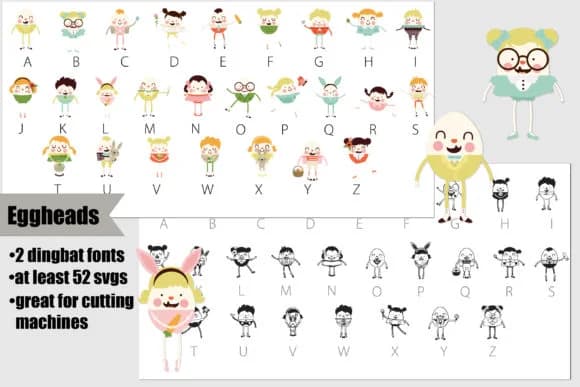
This playful dingbat font brings a cheerful, character-driven spirit to seasonal and craft projects. Eggheads by Illustration Ink delivers quirky egg-shaped figures that work as standalone decorative elements or fill-in characters. You get two versions in one package: a crisp black and white version for simpler applications, plus a full-color SVG variant that absolutely shines when your software supports color fonts. Both formats work beautifully with vinyl cutting machines and digital design tools alike.
Perfect for Easter invitation suites, scrapbooking embellishments, DIY greeting card designs, and personalized water bottle decals, this font punches above its weight for seasonal crafting. Use the whimsical characters to add charm to planner pages, create labels for holiday gift boxes, or design T-shirt transfer art that feels handmade and genuine. The SVG color version displays in full detail within Adobe products, Silhouette Studio, Inkscape, and similar applications that support color fonts. In incompatible programs, it renders as black temporarily, though you'll see the full color effect once you apply it to your actual document.
Pair Eggheads with a clean, neutral sans-serif like Source Sans Pro for balance, letting the playful characters do the visual heavy lifting. Get it on Creative Fabrica and start building your next cheerful creation.
Style & Use Cases
- Overall Style
- Iconographic, Dingbat
- Use Case
- Icons, Accents
- Ideal For
- ornaments, bullets, and decorative flourishes
- Pairs With
- any text font
How to Install Eggheads Font
Step-by-step instructions for every platform
- 1Download the Eggheads font file (.ttf or .otf).
- 2Locate the downloaded file in your Downloads folder.
- 3Right-click the font file.
- 4Select "Install" to install for the current user, or "Install for all users" to make it available system-wide.
- 5Eggheads is now available in Word, Photoshop, Illustrator, and all other apps.
More by Illustration Ink
View all →



Browse fonts by theme
Curated collections →Saw a font in a picture? Identify any font from an image with our free Font Finder.
More Dingbats Fonts
Browse all →







What pairs well with Eggheads Font?
Eggheads Font is a versatile dingbats font that works for both headings and body text. Pair it with a contrasting sans-serif or serif font to add visual interest and a clear distinction between titles and body copy.



Eggheads Font
Reviewed by the FontBoxDL team · Updated July 2026