 Firefox
 1 / 8
1 / 8About Dreamy Doodles Font
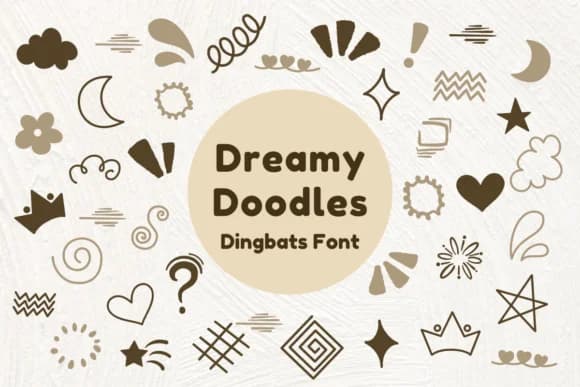
Dreamy Doodles by Nun Sukhwan is a dingbats font that trades letterforms for a collection of whimsical, hand-drawn symbols with an abstract, vintage feel. If you're familiar with decorative symbol fonts, this one sits right at the intersection of playful and elegant, offering ornamental elements that have genuine character without feeling overdone.
The real strength here lies in versatility. These ornaments scatter beautifully between text blocks on wedding invitation suites or cluster as decorative section dividers. Valentine's Day card designs lean heavily on that sweet, dreamlike quality embedded in every glyph. Teachers love using them as visual accents on bulletin boards, breaking up information without cluttering the space. You can also employ them as subtle logo embellishments when you want personality without a secondary font family, or layer them into hand-lettered product label designs for that artisan feel.
Because this is a symbol font, you're not constrained by the usual letter and number grid. Every character is intentional decoration, which means less hunting through assets and more direct access to the elements you need. It's the kind of resource that ends up in your saved library, pulled out whenever you need decorative weight without resorting to generic flourish packs. Pick it up from Creative Fabrica and integrate it into your regular design workflow.
Style & Use Cases
- Overall Style
- Iconographic, Doodles
- Use Case
- Icons, Accents
- Ideal For
- ornaments, bullets, and decorative flourishes
- Pairs With
- any text font
How to Install Dreamy Doodles Font
Step-by-step instructions for every platform
- 1Download the Dreamy Doodles font file (.ttf or .otf).
- 2Locate the downloaded file in your Downloads folder.
- 3Right-click the font file.
- 4Select "Install" to install for the current user, or "Install for all users" to make it available system-wide.
- 5Dreamy Doodles is now available in Word, Photoshop, Illustrator, and all other apps.
More by Nun Sukhwan
View all →



Browse fonts by theme
Curated collections →Saw a font in a picture? Identify any font from an image with our free Font Finder.
More Dingbats Fonts
Browse all →







What pairs well with Dreamy Doodles Font?
Dreamy Doodles Font is a versatile dingbats font that works for both headings and body text. Pair it with a contrasting sans-serif or serif font to add visual interest and a clear distinction between titles and body copy.



Dreamy Doodles Font
by Nun Sukhwan
Reviewed by the FontBoxDL team · Updated June 2026