 Firefox
 1 / 5
1 / 5About Dots Font
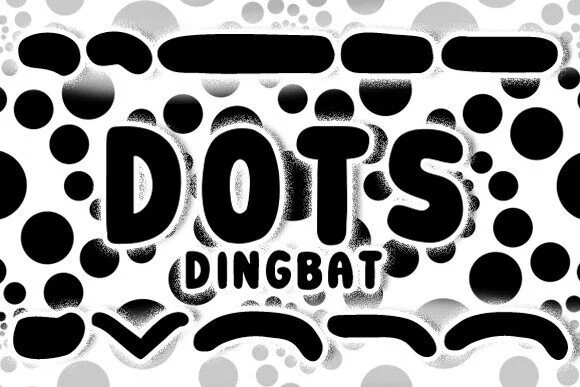
Vladimir Nikolic's Dots is a dingbat typeface built entirely from repeating dot elements, creating ornamental symbols that read as both playful and structured. Rather than traditional characters, you get a collection of decorative marks and shapes that layer dots in clever ways, each one offering visual texture without heavy fills or complex geometry. The approach feels hand-crafted yet organized, making each mark work as a framing element, connector, or standalone accent that doesn't demand attention the way a solid shape might.
This kind of font shines when you need something that reads as whimsical but intentional, not cartoonish in a cheap sense. Consider it for children's book spot illustrations, comic panel borders and dividers, decorative motifs across invitation suites, or DIY poster art where that pointillist quality comes across as purposeful and charming. The dot-based construction keeps every mark light and graphic, so it won't overwhelm busy layouts, and the cartoon sensibility fits especially well for playful briefs where warmth and personality matter as much as precision does.
Dots works best for designers and makers looking to add a quirky, character-driven texture layer to their projects without needing a photorealistic approach. Grab it on Creative Fabrica and start experimenting with how it layers into your next design.
Style & Use Cases
- Overall Style
- Iconographic, Dots
- Use Case
- Icons, Accents
- Ideal For
- ornaments, bullets, and decorative flourishes
- Pairs With
- any text font
How to Install Dots Font
Step-by-step instructions for every platform
- 1Download the Dots font file (.ttf or .otf).
- 2Locate the downloaded file in your Downloads folder.
- 3Right-click the font file.
- 4Select "Install" to install for the current user, or "Install for all users" to make it available system-wide.
- 5Dots is now available in Word, Photoshop, Illustrator, and all other apps.
More by vladimirnikolic
View all →


Browse fonts by theme
Curated collections →Saw a font in a picture? Identify any font from an image with our free Font Finder.
More Dingbats Fonts
Browse all →







What pairs well with Dots Font?
Dots Font is a versatile dingbats font that works for both headings and body text. Pair it with a contrasting sans-serif or serif font to add visual interest and a clear distinction between titles and body copy.




Dots Font
Reviewed by the FontBoxDL team · Updated July 2026