 Firefox
 1 / 4
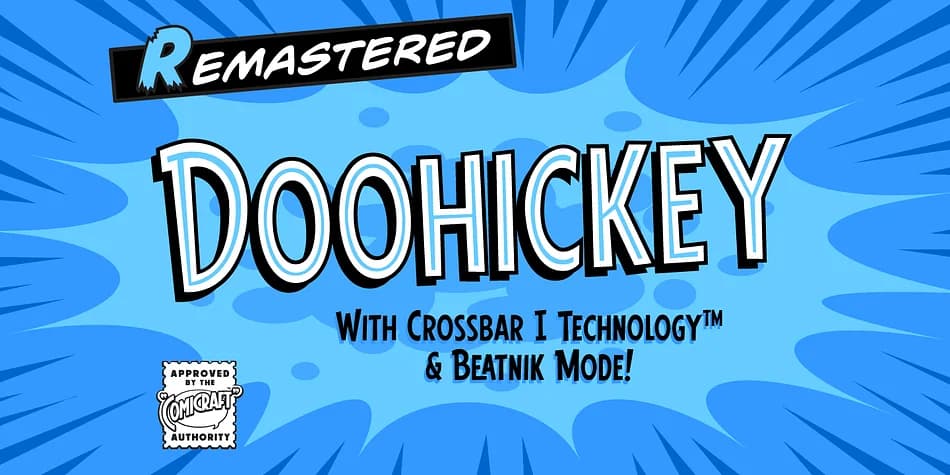
1 / 4About Doohickey Font
Picture a retro arcade entrance where garish neon signs catch the eye before you walk through the doors. Doohickey, designed by Comicraft, brings that same playful, unapologetic energy to any project that thrives on personality over polish.
This decorative typeface works beautifully for comic book covers, vintage pinball machine graphics, and novelty merchandise that needs real character. Indie game developers love it for UI and menu text because it reads as intentionally wonky rather than broken. You'll also find it landing strong on retro-themed t-shirt designs, DIY zine headers, and steampunk poster work where a hint of controlled chaos helps the message stick. The quirky bounce in the letterforms keeps things light even when you're packing words tight.
The font embraces its irregular charm without apology. Its weight and glyph set give it plenty of room to breathe across large display sizes. The characters read equally strong on bold headlines or tucked into compact layouts. Hold them at any scale and they keep their weird personality, which is exactly what you need when you want to stand out. If your goal is to feel handmade, slightly chaotic, and genuinely fun rather than polished, Doohickey delivers. Grab it on Creative Fabrica and put this quirky font to work.
Style & Use Cases
- Overall Style
- Bold, Distinctive
- Use Case
- Headlines, Posters
- Ideal For
- logos, packaging, and standout titles
- Pairs With
- a neutral sans-serif
How to Install Doohickey Font
Step-by-step instructions for every platform
- 1Download the Doohickey font file (.ttf or .otf).
- 2Locate the downloaded file in your Downloads folder.
- 3Right-click the font file.
- 4Select "Install" to install for the current user, or "Install for all users" to make it available system-wide.
- 5Doohickey is now available in Word, Photoshop, Illustrator, and all other apps.
More by Comicraft
View all →
Browse fonts by theme
Curated collections →Saw a font in a picture? Identify any font from an image with our free Font Finder.
More Decorative Fonts
Browse all →







What pairs well with Doohickey Font?
Doohickey Font is a decorative font that shines as a display or heading face. Pair it with a clean sans-serif or serif font for body text — the contrast creates a clear hierarchy while the two styles stay balanced and easy to read.



Doohickey Font
by Comicraft
Reviewed by the FontBoxDL team · Updated July 2026