 Firefox
 1 / 8
1 / 8About Doodles Halloween Font
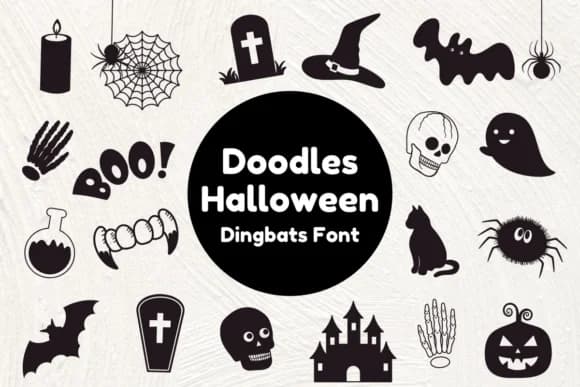
Doodles Halloween, designed by Nun Sukhwan, is a dingbats font built around clean vector silhouettes of seasonal imagery. The font maps Halloween symbols directly to your keyboard: pumpkins, bats, skulls, spiders, webs, witch hats, cats, coffins, candles, and potions sit ready to place into layouts without digging through symbol menus. Each glyph comes as a solid fill with no strokes, which means your cuts stay crisp whether you're working with a cutting machine or simplifying artwork for print. The consistent weight and baseline let you mix icons directly with standard text, and you can recolor the whole set instantly to match any seasonal theme or project palette.
From spooky party invitation suites to classroom bulletin board decorations, this font handles seasonal graphics efficiently. DIY craft labels, Etsy product graphics, and Halloween costume design guides all benefit from having scalable, recognizable symbols that don't require additional illustration work. Teachers often reach for symbol fonts like this one to add visual interest to worksheets and handouts without slowing down their workflow. The lightweight file size and keyboard-based access make it a reliable choice for anyone creating graphics on a deadline.
This is the font for designers and makers who need Halloween imagery that works across print, web, and cutting applications. Find Doodles Halloween on Creative Fabrica and start building seasonal projects with a single typeface.
Style & Use Cases
- Overall Style
- Iconographic, Doodles Halloween
- Use Case
- Icons, Accents
- Ideal For
- ornaments, bullets, and decorative flourishes
- Pairs With
- any text font
How to Install Doodles Halloween Font
Step-by-step instructions for every platform
- 1Download the Doodles Halloween font file (.ttf or .otf).
- 2Locate the downloaded file in your Downloads folder.
- 3Right-click the font file.
- 4Select "Install" to install for the current user, or "Install for all users" to make it available system-wide.
- 5Doodles Halloween is now available in Word, Photoshop, Illustrator, and all other apps.
More by Nun Sukhwan
View all →



Browse fonts by theme
Curated collections →Saw a font in a picture? Identify any font from an image with our free Font Finder.
More Dingbats Fonts
Browse all →







What pairs well with Doodles Halloween Font?
Doodles Halloween Font is a versatile dingbats font that works for both headings and body text. Pair it with a contrasting sans-serif or serif font to add visual interest and a clear distinction between titles and body copy.



Doodles Halloween Font
by Nun Sukhwan
Reviewed by the FontBoxDL team · Updated July 2026