 Firefox
 1 / 8
1 / 8About Doodle Flower Font
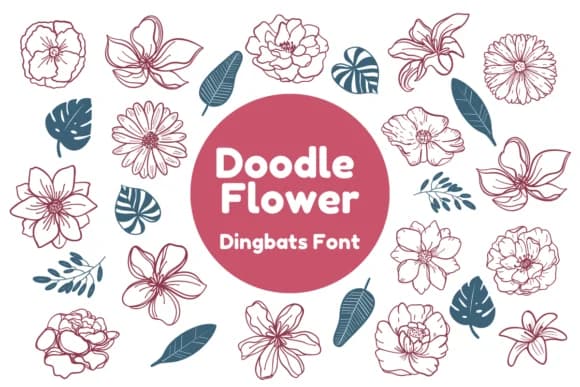
Doodle Flower has a playful, handcrafted warmth that makes you want to create something joyful. Nun Sukhwan designed this dingbat font with delicate botanical motifs, each sketch capturing the particular charm of vintage greeting cards and mid-century botanical illustration.
The collection works beautifully for wedding invitation suites where florals need to feel organic, teacher reward stickers that kids actually value and keep, Valentine card designs with genuine personality, and DIY craft signs for boutique shops or home displays. Beyond these, it suits custom sticker sheets for small business branding and personalised gift tags where a homemade touch matters. Each glyph operates as both decorative border element and standalone illustration. The monochrome design delivers clean silhouettes that work perfectly with cutting machines, screen printing onto t-shirts and canvas totebags, or laser engraving on wood and acrylic pieces. You get enough glyphs to build complete floral frames, corner flourishes, and scattered botanical elements that hold a layout together.
Combine Doodle Flower with a straightforward sans-serif like Open Sans when you need readable text alongside the florals, letting the decorative elements command visual attention. Get it on Creative Fabrica and bring the handmade warmth to your next project.
Style & Use Cases
- Overall Style
- Iconographic, Dingbats Font
- Use Case
- Icons, Accents
- Ideal For
- ornaments, bullets, and decorative flourishes
- Pairs With
- any text font
How to Install Doodle Flower Font
Step-by-step instructions for every platform
- 1Download the Doodle Flower font file (.ttf or .otf).
- 2Locate the downloaded file in your Downloads folder.
- 3Right-click the font file.
- 4Select "Install" to install for the current user, or "Install for all users" to make it available system-wide.
- 5Doodle Flower is now available in Word, Photoshop, Illustrator, and all other apps.
More by Nun Sukhwan
View all →



Browse fonts by theme
Curated collections →Saw a font in a picture? Identify any font from an image with our free Font Finder.
More Dingbats Fonts
Browse all →







What pairs well with Doodle Flower Font?
Doodle Flower Font is a versatile dingbats font that works for both headings and body text. Pair it with a contrasting sans-serif or serif font to add visual interest and a clear distinction between titles and body copy.



Doodle Flower Font
by Nun Sukhwan
Reviewed by the FontBoxDL team · Updated July 2026