 Firefox
 1 / 8
1 / 8About Doodle Element Font
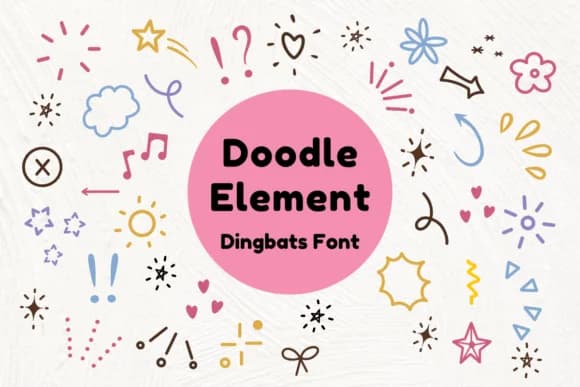
Doodle Element by Nun Sukhwan is a playful dingbats font full of hand-drawn abstract marks and whimsical details. The collection works beautifully for projects that need ornamental touches: Valentine's greeting cards, teacher bulletin board displays, vintage-inspired apparel graphics, and handmade craft embellishments are all solid matches for this font's personality. Because it's a dingbats font, you get flexibility that a traditional typeface can't offer; you can layer these elements without worrying about readability or hierarchy issues.
Designers love this kind of decorative font when building scrapbook layouts, creating Etsy sticker sheets, or adding flourish to hand-labeled gift boxes and thank you cards. The hand-drawn quality gives designs a crafted feeling that readers respond to emotionally. Wedding invitation suites benefit from these marks as decorative borders, accent pieces, or spacing elements between text blocks. You can also use the font to add personality to logo concepts, children's activity sheets, classroom decorations, and any design where charm matters more than strict formality.
This font fills a specific need in the designer's toolkit: those moments when you want visual interest but don't need an actual typeface. Doodle Element earns its place through sheer versatility. Get it on Creative Fabrica and start discovering new ways to layer these charming marks into your work.
Style & Use Cases
- Overall Style
- Iconographic, Doodle Element
- Use Case
- Icons, Accents
- Ideal For
- ornaments, bullets, and decorative flourishes
- Pairs With
- any text font
How to Install Doodle Element Font
Step-by-step instructions for every platform
- 1Download the Doodle Element font file (.ttf or .otf).
- 2Locate the downloaded file in your Downloads folder.
- 3Right-click the font file.
- 4Select "Install" to install for the current user, or "Install for all users" to make it available system-wide.
- 5Doodle Element is now available in Word, Photoshop, Illustrator, and all other apps.
More by Nun Sukhwan
View all →



Browse fonts by theme
Curated collections →Saw a font in a picture? Identify any font from an image with our free Font Finder.
More Dingbats Fonts
Browse all →







What pairs well with Doodle Element Font?
Doodle Element Font is a versatile dingbats font that works for both headings and body text. Pair it with a contrasting sans-serif or serif font to add visual interest and a clear distinction between titles and body copy.



Doodle Element Font
by Nun Sukhwan
Reviewed by the FontBoxDL team · Updated July 2026