
 1 / 8
1 / 8About Doodle Dentist Font
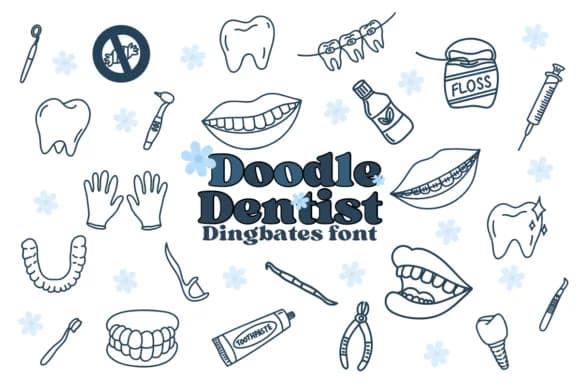
These dingbat characters replace traditional letters with sketch-style dental imagery, giving your designs a handmade rather than corporate feel. Chonada created Doodle Dentist to fill the gap between clinical and playful, delivering hand-drawn icons of toothbrushes, teeth, floss, dental mirrors, braces, orthodontic bands, and an assortment of oral care tools. The linework feels informal and characterful, avoiding the sterile look typical of medical graphics while maintaining excellent clarity at all sizes.
Pediatric practices, dental wholesalers, and healthcare brands use it for appointment reminder cards, clinic window signage, patient education posters, and social media content that needs to feel inviting rather than intimidating. The set works wonderfully on children's toothbrush packaging, orthodontist business cards, hygiene tip graphics, DIY dental care guides, and practice welcome materials. Even at thumbnail sizes, each icon remains distinct and readable, while larger applications show off the sketchy personality that makes the font feel handmade. Dentists wanting to reduce patient anxiety find the approachable aesthetic particularly valuable.
This font speaks to healthcare designers, pediatric specialists, children's health brands, and anyone creating patient-facing dental materials. It transforms inherently clinical subject matter into something approachable and even lighthearted. Grab Doodle Dentist from Creative Fabrica to add personality and warmth to your next dental design project.
Style & Use Cases
- Overall Style
- Iconographic, Dentist
- Use Case
- Icons, Accents
- Ideal For
- ornaments, bullets, and decorative flourishes
- Pairs With
- any text font
How to Install Doodle Dentist Font
Step-by-step instructions for every platform
- 1Download the Doodle Dentist font file (.ttf or .otf).
- 2Locate the downloaded file in your Downloads folder.
- 3Right-click the font file.
- 4Select "Install" to install for the current user, or "Install for all users" to make it available system-wide.
- 5Doodle Dentist is now available in Word, Photoshop, Illustrator, and all other apps.




Browse fonts by theme
Curated collections →Saw a font in a picture? Identify any font from an image with our free Font Finder.
More Dingbats Fonts
Browse all →







What pairs well with Doodle Dentist Font?
Doodle Dentist Font is a versatile dingbats font that works for both headings and body text. Pair it with a contrasting sans-serif or serif font to add visual interest and a clear distinction between titles and body copy.



Doodle Dentist Font
by Chonada
Reviewed by the FontBoxDL team · Updated August 2026