 Firefox
 1 / 8
1 / 8About Doodle Decorate Font
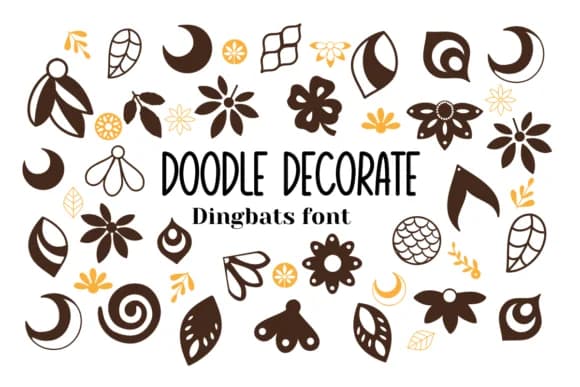
This typeface captures the genuine joy of hand-drawn botanical sketches. Doodle Decorate, crafted by Nun Sukhwan, is a dingbat font brimming with whimsical leaves, flowers, vines, and intricate flourishes that function both as ornamental text accents and as standalone decorative elements. Each keystroke reveals a fresh floral or leafy character, making ornamental borders and scattered embellishments feel as intuitive as typing a regular sentence. The design philosophy is clear: bring botanical warmth to projects without requiring complicated graphic layering or multiple typeface families to achieve depth and interest.
Put it to work designing Valentine greeting card suites with custom floral borders, crafting handmade sticker sheets for Etsy and craft marketplace sellers, creating personalized product labels and packaging tags for artisanal goods, or building engaging classroom bulletin displays that students actually stop to notice. Within this dingbat collection you'll discover substantial variety in floral motifs and leaf formations, allowing you to build complete ornamental compositions using just this font without repetition becoming tedious. Pair Doodle Decorate with a quiet, structured sans-serif like Poppins or Lato for layouts where botanical elements need visual emphasis while body copy remains accessible. You'll find it on Creative Fabrica, ready to bring hand-drawn nature-rooted warmth to your next design.
Style & Use Cases
- Overall Style
- Iconographic, Dingbats Font
- Use Case
- Icons, Accents
- Ideal For
- ornaments, bullets, and decorative flourishes
- Pairs With
- any text font
How to Install Doodle Decorate Font
Step-by-step instructions for every platform
- 1Download the Doodle Decorate font file (.ttf or .otf).
- 2Locate the downloaded file in your Downloads folder.
- 3Right-click the font file.
- 4Select "Install" to install for the current user, or "Install for all users" to make it available system-wide.
- 5Doodle Decorate is now available in Word, Photoshop, Illustrator, and all other apps.
More by Nun Sukhwan
View all →



Browse fonts by theme
Curated collections →Saw a font in a picture? Identify any font from an image with our free Font Finder.
More Dingbats Fonts
Browse all →







What pairs well with Doodle Decorate Font?
Doodle Decorate Font is a versatile dingbats font that works for both headings and body text. Pair it with a contrasting sans-serif or serif font to add visual interest and a clear distinction between titles and body copy.



Doodle Decorate Font
by Nun Sukhwan
Reviewed by the FontBoxDL team · Updated July 2026