 Firefox
 1 / 8
1 / 8Loading font…
About Doodle Cute Font
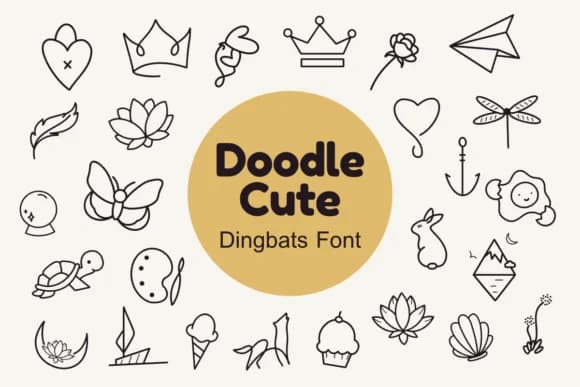
This dingbat collection brings instant joy and personality to any design. Doodle Cute, created by Nun Sukhwan, is packed with hand-drawn icons that feel like they belong in a vintage craft journal full of creative possibilities. The set features hearts, flowers, butterflies, and other whimsical ornaments that work beautifully as both individual accents and repeating patterns throughout a layout.
Use this set for greeting card embellishments where you want visual warmth without clutter, DIY hand-lettered gift tags that stand out on presents, or scattered throughout wedding stationery to add a nostalgic touch. Scrapbooking layouts benefit tremendously from these elements too, especially when layering different icons to build visual interest on a page. The hand-drawn quality gives everything an authentic, personal feel that reads as intentional rather than generic stock art.
You can also incorporate these into classroom materials, vinyl sticker designs, or as decorative accents in handmade journals and personal projects. The versatility of the icon set means you'll find uses beyond your initial concept. Pair Doodle Cute with a clean, minimal sans-serif like Montserrat or Futura for body text to keep layouts balanced and readable. It's available now on Creative Fabrica for those ready to add handmade charm to their designs.
Style & Use Cases
- Overall Style
- Iconographic, Dingbats Font
- Use Case
- Icons, Accents
- Ideal For
- ornaments, bullets, and decorative flourishes
- Pairs With
- any text font
How to Install Doodle Cute Font
Step-by-step instructions for every platform
- 1Download the Doodle Cute font file (.ttf or .otf).
- 2Locate the downloaded file in your Downloads folder.
- 3Right-click the font file.
- 4Select "Install" to install for the current user, or "Install for all users" to make it available system-wide.
- 5Doodle Cute is now available in Word, Photoshop, Illustrator, and all other apps.
More by Nun Sukhwan
View all →



Browse fonts by theme
Curated collections →Saw a font in a picture? Identify any font from an image with our free Font Finder.
More Dingbats Fonts
Browse all →







What pairs well with Doodle Cute Font?
Doodle Cute Font is a versatile dingbats font that works for both headings and body text. Pair it with a contrasting sans-serif or serif font to add visual interest and a clear distinction between titles and body copy.



Doodle Cute Font
by Nun Sukhwan
Reviewed by the FontBoxDL team · Updated October 2026