 Firefox
 1 / 7
1 / 7About Doodle Arrows Font
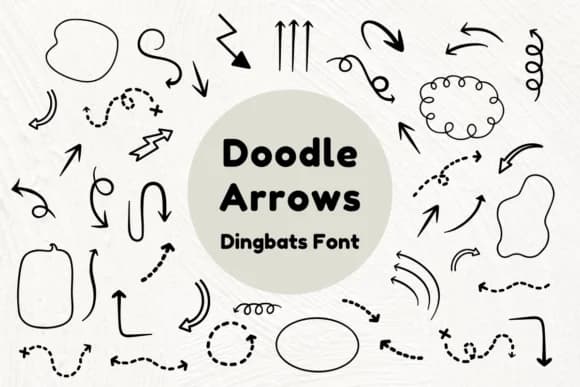
Doodle Arrows, created by Nun Sukhwan, brings a loose, sketch-like energy to your typographic toolkit. These aren't stiff directional symbols, but charming hand-drawn arrows with a playful, vintage character that feels both approachable and intentional.
The collection works beautifully in contexts where a genuine, handmade aesthetic matters most. Use these dingbats for vintage greeting card suites, personalized gift tag designs, children's craft worksheet layouts, or custom journal covers that need personality. They're equally at home adding warmth to wedding stationery, DIY signage projects, small-batch product labels for handmade goods, and scrapbook embellishments. The playfulness here is genuine rather than forced, which means the font reads well at different scales without losing its charm or legibility. Each arrow carries that sketchy, unpolished quality that makes handmade work feel authentic and human.
This is the kind of typeface that appeals to makers, designers who work with hand-lettering traditions, and anyone building projects that ask for warmth over sterile polish. Creators working for Etsy sellers will love this, as will those running stationery lines or designing pieces that value a human touch. Doodle Arrows fits perfectly into DIY, craft, and artisanal work. Find it on Creative Fabrica to add it to your library.
Style & Use Cases
- Overall Style
- Iconographic, Doodle Arrows
- Use Case
- Icons, Accents
- Ideal For
- ornaments, bullets, and decorative flourishes
- Pairs With
- any text font
How to Install Doodle Arrows Font
Step-by-step instructions for every platform
- 1Download the Doodle Arrows font file (.ttf or .otf).
- 2Locate the downloaded file in your Downloads folder.
- 3Right-click the font file.
- 4Select "Install" to install for the current user, or "Install for all users" to make it available system-wide.
- 5Doodle Arrows is now available in Word, Photoshop, Illustrator, and all other apps.
More by Nun Sukhwan
View all →



Browse fonts by theme
Curated collections →Saw a font in a picture? Identify any font from an image with our free Font Finder.
More Dingbats Fonts
Browse all →







What pairs well with Doodle Arrows Font?
Doodle Arrows Font is a versatile dingbats font that works for both headings and body text. Pair it with a contrasting sans-serif or serif font to add visual interest and a clear distinction between titles and body copy.



Doodle Arrows Font
by Nun Sukhwan
Reviewed by the FontBoxDL team · Updated July 2026