 Firefox
 1 / 8
1 / 8About Doodle Arrows Font
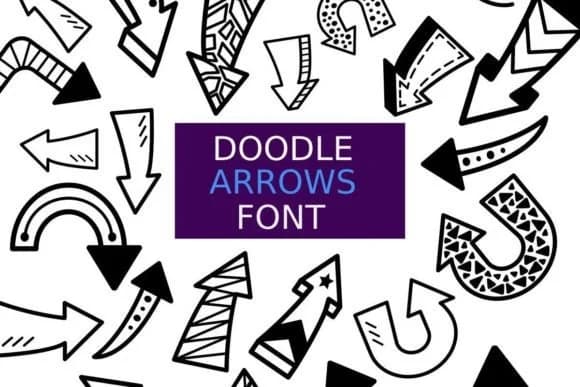
Imagine you're setting up a digital planner and need quick directional elements that don't feel stiff or formal alongside your hand-drawn notes. Doodle Arrows, created by digitalplannerland, is a dingbat font built for exactly that moment. It brings a collection of playful arrow glyphs, dividers, and ornamental shapes that work as both practical navigation elements and visual flourishes throughout your designs.
This font truly shines for bullet journal spreads, printable activity book pages, sticker sheet designs for craft marketplaces, and hand-lettered craft labels where personality matters most. Each glyph carries a distinctly cute, sketch-like energy that belongs in kawaii-inspired work and handmade-feeling projects. Both OTF and TTF formats come included, giving you complete flexibility for digital planner templates, scrapbooking assets, printable sticker sheets for Etsy sellers, DIY greeting cards, and decorative packaging elements across different creative projects.
The outline and filled versions give you multiple creative ways to adapt these arrows to match your exact color palette and aesthetic vision. Scale them down to fine details or blow them up as focal points in your layouts, and they maintain their character beautifully either way. Get this font on Creative Fabrica and bring a handmade quality and charm to your design work.
Style & Use Cases
- Overall Style
- Iconographic, Doodle
- Use Case
- Icons, Accents
- Ideal For
- ornaments, bullets, and decorative flourishes
- Pairs With
- any text font
How to Install Doodle Arrows Font
Step-by-step instructions for every platform
- 1Download the Doodle Arrows font file (.ttf or .otf).
- 2Locate the downloaded file in your Downloads folder.
- 3Right-click the font file.
- 4Select "Install" to install for the current user, or "Install for all users" to make it available system-wide.
- 5Doodle Arrows is now available in Word, Photoshop, Illustrator, and all other apps.
More by digitalplannerland
View all →
Browse fonts by theme
Curated collections →Saw a font in a picture? Identify any font from an image with our free Font Finder.
More Dingbats Fonts
Browse all →







What pairs well with Doodle Arrows Font?
Doodle Arrows Font is a versatile dingbats font that works for both headings and body text. Pair it with a contrasting sans-serif or serif font to add visual interest and a clear distinction between titles and body copy.



Doodle Arrows Font
Reviewed by the FontBoxDL team · Updated July 2026