 Firefox
 1 / 8
1 / 8About Dollicious Font
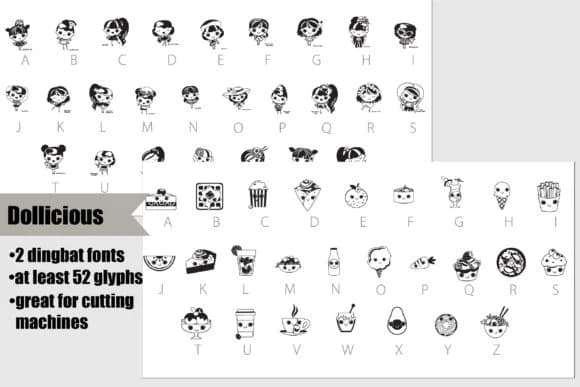
Dollicious Font by Illustration Ink brings a playful dingbat collection built around food-loving character graphics. The bundle splits into two complementary fonts: one showcases cute dolls and their favorite treats, the other focuses purely on the foods themselves. Both contain multiple glyphs for layered, varied compositions. This pair works beautifully for vinyl decal projects on water bottles and personalized gifts, DIY labels for homemade baked goods, custom scrapbook pages, and children's party invitations with genuine character. The glyphs are optimized for cutting machines, but they're just as nice hand-cut or printed as standalone elements on cards or paper crafts.
What makes this collection feel less templated than typical dingbat sets is the complementary approach: combining the doll characters with the food elements lets you build custom scenes and compositions rather than feel locked into one look. The design style is consistent and cohesive, so layering characters and treats stays visually balanced. Gift tags, planner spreads, sticker sheets, and craft project labels all benefit from having both fonts on hand. The characters carry enough personality that even simple two-color vinyl work reads as considered rather than generic.
Grab Dollicious Font on Creative Fabrica to add these character graphics to your next maker or cutting project.
Style & Use Cases
- Overall Style
- Iconographic, Dingbat
- Use Case
- Icons, Accents
- Ideal For
- ornaments, bullets, and decorative flourishes
- Pairs With
- any text font
How to Install Dollicious Font Font
Step-by-step instructions for every platform
- 1Download the Dollicious Font font file (.ttf or .otf).
- 2Locate the downloaded file in your Downloads folder.
- 3Right-click the font file.
- 4Select "Install" to install for the current user, or "Install for all users" to make it available system-wide.
- 5Dollicious Font is now available in Word, Photoshop, Illustrator, and all other apps.
More by Illustration Ink
View all →



Browse fonts by theme
Curated collections →Saw a font in a picture? Identify any font from an image with our free Font Finder.
More Dingbats Fonts
Browse all →







What pairs well with Dollicious Font?
Dollicious Font is a versatile dingbats font that works for both headings and body text. Pair it with a contrasting sans-serif or serif font to add visual interest and a clear distinction between titles and body copy.



Dollicious Font
Reviewed by the FontBoxDL team · Updated July 2026