 Firefox
 1 / 8
1 / 8About Dice Doodle Font
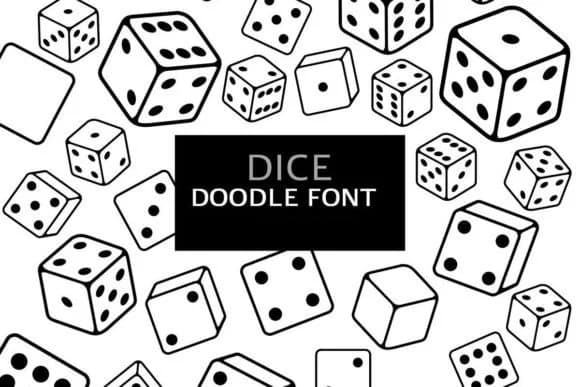
When you're decorating a digital planner spread or printing a batch of custom sticker sheets for a craft studio, Dice Doodle from digitalplannerland delivers the cheerful visual spark you need. This dingbat font turns any project into something that feels genuinely handcrafted through its collection of charming, illustrated character elements that work as ornaments, page dividers, and playful embellishments between text.
The real strength lies in specific applications where you need decorative accents rather than letters. Digital planner stickers that divide sections and draw attention look sharp with this set. Printed sticker sheets for scrapbooks gain personality through the varied ornamental marks. Hand-lettered craft sign designs benefit from the little flourishes to frame key words. Custom journal dividers become focal points when layered with these doodles. The outline rendering style keeps the characters legible even when scaled to large sizes on printed pieces, while smaller versions still read clearly on screen.
Both OTF and TTF formats ship with the font, so you can use it wherever your design software lives. The charming aesthetic pairs well with both digital and print workflows, making it a genuinely versatile choice for anyone building resources around planning, crafting, or journaling. You'll find Dice Doodle waiting on Creative Fabrica whenever you're ready to grab it.
Style & Use Cases
- Overall Style
- Iconographic, Doodle
- Use Case
- Icons, Accents
- Ideal For
- ornaments, bullets, and decorative flourishes
- Pairs With
- any text font
How to Install Dice Doodle Font
Step-by-step instructions for every platform
- 1Download the Dice Doodle font file (.ttf or .otf).
- 2Locate the downloaded file in your Downloads folder.
- 3Right-click the font file.
- 4Select "Install" to install for the current user, or "Install for all users" to make it available system-wide.
- 5Dice Doodle is now available in Word, Photoshop, Illustrator, and all other apps.
More by digitalplannerland
View all →
Browse fonts by theme
Curated collections →Saw a font in a picture? Identify any font from an image with our free Font Finder.
More Dingbats Fonts
Browse all →







What pairs well with Dice Doodle Font?
Dice Doodle Font is a versatile dingbats font that works for both headings and body text. Pair it with a contrasting sans-serif or serif font to add visual interest and a clear distinction between titles and body copy.



Dice Doodle Font
Reviewed by the FontBoxDL team · Updated July 2026