 Firefox
 1 / 8
1 / 8Loading font…
About Design Doodle Font
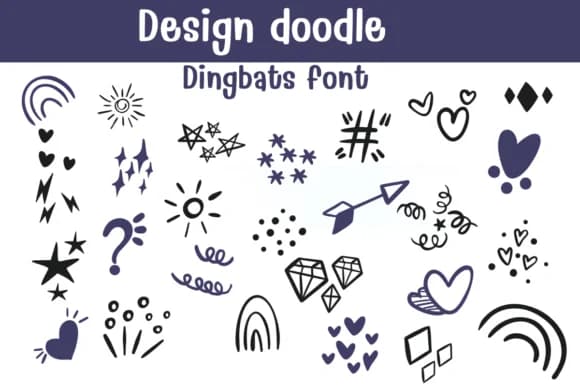
You're laying out a baby shower invitation, sketching out the border treatments, and you need a set of playful icons that feel genuinely hand-drawn instead of generic clip-art. Design Doodle by Sontaya delivers exactly that: a dingbats font packed with whimsical doodles, from stars and hearts to arrows, swirls, trees, cupcakes, and organic shapes that bring real charm to your work. The hand-drawn quality means these elements actually read as thoughtful design detail rather than off-the-shelf filler, giving your layouts genuine personality instead of that mass-produced feel.
This font shines for baby announcement cards, DIY planner spreads with decorative flourishes, garden-themed coloring pages, and Christmas gift tag designs. Teachers use it for classroom worksheets, crafters apply it to Etsy printables, and scrapbookers layer it across their pages for instant visual interest. You can design children's craft activities or package designs for boutique products, pulling from a doodle set that actually matches what you're building. The outline rendering makes each doodle work as a standalone graphic or woven into larger compositions, giving you flexibility in how you arrange them. At larger sizes, the strokes hold their weight without getting muddy, keeping even dense arrangements clear. Grab Design Doodle on Creative Fabrica and bring genuine handmade warmth to your next project.
Style & Use Cases
- Overall Style
- Iconographic, Fonts
- Use Case
- Icons, Accents
- Ideal For
- ornaments, bullets, and decorative flourishes
- Pairs With
- any text font
How to Install Design Doodle Font
Step-by-step instructions for every platform
- 1Download the Design Doodle font file (.ttf or .otf).
- 2Locate the downloaded file in your Downloads folder.
- 3Right-click the font file.
- 4Select "Install" to install for the current user, or "Install for all users" to make it available system-wide.
- 5Design Doodle is now available in Word, Photoshop, Illustrator, and all other apps.
Browse fonts by theme
Curated collections →Saw a font in a picture? Identify any font from an image with our free Font Finder.
More Dingbats Fonts
Browse all →







What pairs well with Design Doodle Font?
Design Doodle Font is a versatile dingbats font that works for both headings and body text. Pair it with a contrasting sans-serif or serif font to add visual interest and a clear distinction between titles and body copy.



Design Doodle Font
by Sontaya
Reviewed by the FontBoxDL team · Updated October 2026