 Firefox
 1 / 8
1 / 8About Decorate Doodle Font
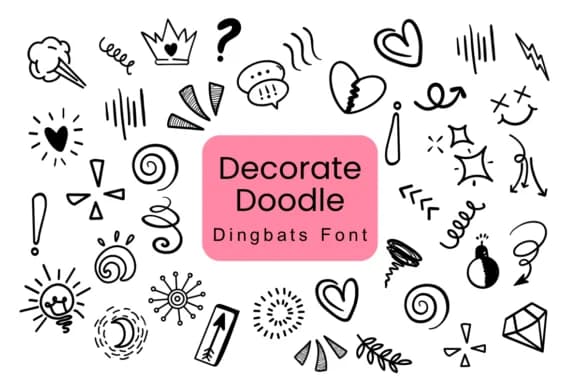
Decorate Doodle by Nun Sukhwan is a whimsical dingbats font brimming with hand-drawn ornaments and flourishes. The collection includes hearts, stars, flowers, and decorative elements that work beautifully for scrapbooking layouts, teacher reward stickers, Valentine's Day card suites, and DIY vintage gift tags. Each glyph carries a charming, informal quality that feels genuinely handcrafted rather than sterile or mass-produced. The monochrome design means these ornaments layer well over other fonts and imagery without creating visual clutter.
This font shines when you need decorative elements that enhance lettering without competing for attention. Pair it with a clean sans-serif or script and you've got a polished combination ready for custom t-shirt graphics, kids' birthday invitations, or as background elements on packaging and product labels. Because it's a dingbat set, you get a full arsenal of symbols ready to drop straight into your projects, saving you the time of hunting for separate graphics or doodling your own embellishments.
The vintage sensibility makes it particularly useful for boutique small-batch branding, hand-lettered signage, and DIY craft projects. Sticker sheets gain visual interest from these doodles, as do classroom materials and scrapbook pages. The warm, personal quality lifts even simple layouts and brings immediate character to the work. Grab Decorate Doodle on Creative Fabrica and start layering these charming ornaments into your next design.
Style & Use Cases
- Overall Style
- Iconographic, Dingbats Font
- Use Case
- Icons, Accents
- Ideal For
- ornaments, bullets, and decorative flourishes
- Pairs With
- any text font
How to Install Decorate Doodle Font
Step-by-step instructions for every platform
- 1Download the Decorate Doodle font file (.ttf or .otf).
- 2Locate the downloaded file in your Downloads folder.
- 3Right-click the font file.
- 4Select "Install" to install for the current user, or "Install for all users" to make it available system-wide.
- 5Decorate Doodle is now available in Word, Photoshop, Illustrator, and all other apps.
More by Nun Sukhwan
View all →



Browse fonts by theme
Curated collections →Saw a font in a picture? Identify any font from an image with our free Font Finder.
More Dingbats Fonts
Browse all →







What pairs well with Decorate Doodle Font?
Decorate Doodle Font is a versatile dingbats font that works for both headings and body text. Pair it with a contrasting sans-serif or serif font to add visual interest and a clear distinction between titles and body copy.



Decorate Doodle Font
by Nun Sukhwan
Reviewed by the FontBoxDL team · Updated July 2026