 Firefox
 1 / 5
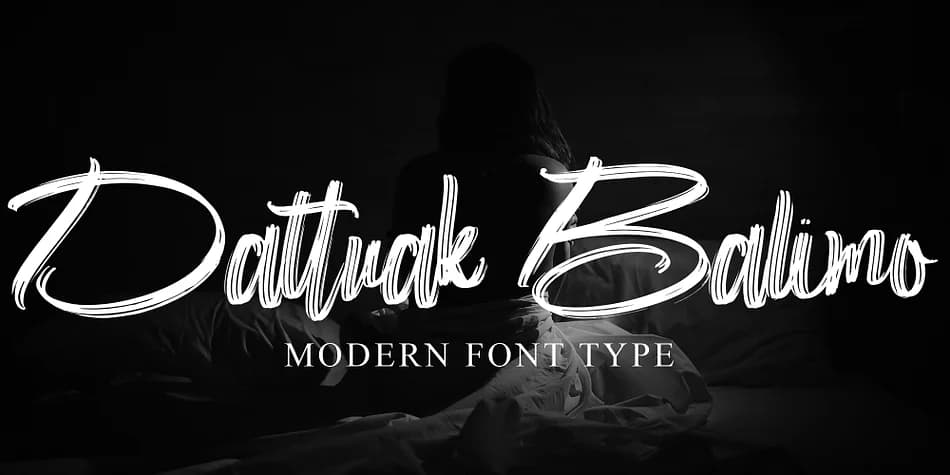
1 / 5About Dattuak Balimo Font
This script flows with the kind of intentionality that reads polished rather than stiff. Dattuak Balimo, designed by Ayska, captures that rare balance where modern refinement meets genuine handwritten character. Each letterform carries real weight and movement through the alphabet, giving the font genuine versatility across both serious and playful applications. Unlike scripts that sit pretty in a drawer, this one does actual work across different projects and mediums.
Wedding invitation suites are where this script genuinely excels, but it translates beautifully to luxury product branding, boutique skincare packaging, and high-end greeting card designs where the recipient notices the detail work. Restaurant menus, album covers, and personalized gift tags are equally at home with this typeface, especially where a handwritten aesthetic conveys care rather than casualness. The cadence of each word reads hand-drawn without sacrificing legibility, so even at smaller sizes it holds its character and presence.
When you need body text or supporting elements, pair Dattuak Balimo with a clean, neutral sans-serif to let both typefaces breathe and balance each other. The contrast gives you immediate visual hierarchy while keeping the overall impression unified and intentional. Grab it from Creative Fabrica and bring that handcrafted touch to your next project.
Style & Use Cases
- Overall Style
- Elegant, Flowing
- Use Case
- Invitations, Branding
- Ideal For
- wedding stationery, greeting cards, and signatures
- Pairs With
- a simple uppercase sans
How to Install Dattuak Balimo Font
Step-by-step instructions for every platform
- 1Download the Dattuak Balimo font file (.ttf or .otf).
- 2Locate the downloaded file in your Downloads folder.
- 3Right-click the font file.
- 4Select "Install" to install for the current user, or "Install for all users" to make it available system-wide.
- 5Dattuak Balimo is now available in Word, Photoshop, Illustrator, and all other apps.

Browse fonts by theme
Curated collections →Saw a font in a picture? Identify any font from an image with our free Font Finder.
More Script Handwritten Fonts
Browse all →







What pairs well with Dattuak Balimo Font?
Dattuak Balimo Font is a script font that shines as a display or heading face. Pair it with a clean sans-serif or serif font for body text — the contrast creates a clear hierarchy while the two styles stay balanced and easy to read.



Dattuak Balimo Font
by Ayska
Reviewed by the FontBoxDL team · Updated July 2026