 Firefox
 1 / 10
About Dalbergia Script Font
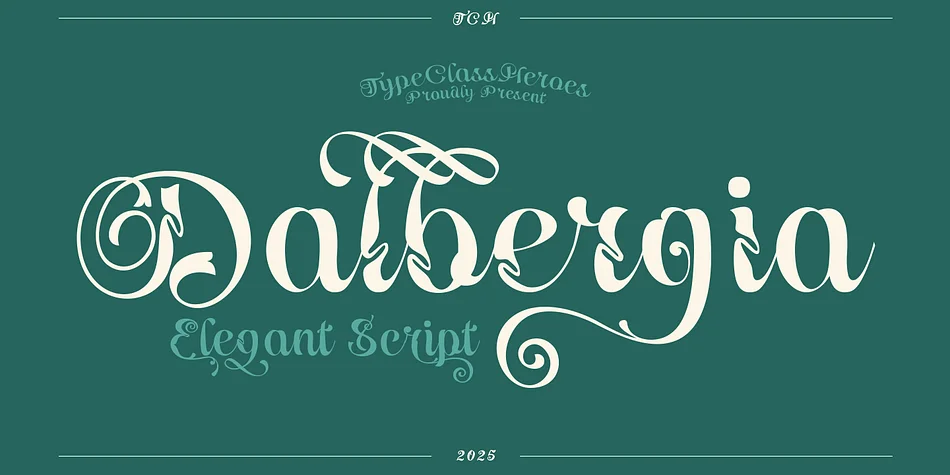
Dalbergia Script Font by TypeClassHeroes is an elegant, flowing script with a refined classical character. The letterforms move across the baseline with organic curves and flourishes that feel both sophisticated and approachable. Built with working designers in mind, Dalbergia includes extensive ligatures and alternate glyphs that give you genuine flexibility when crafting layouts and visual hierarchies. Put it to work on wedding invitation suites, luxury skincare packaging, custom event stationery, and boutique brand collateral where the typography itself signals quality and care.
Both OTF and TTF formats ship with the font, along with WOFF and WOFF2 web variants for digital projects. Character support spans uppercase and lowercase letters, numerals, symbols, and international glyphs for non-Latin alphabets. The alternates and ligatures let you refine individual letterforms or build more ornate compositions depending on how much detail your specific project calls for.
Dalbergia excels in bespoke branding work where clients expect something more thoughtful than stock typefaces. From custom brand identities to Etsy product labels, hand-lettered website headers, and luxury packaging, this typeface brings a sense of crafted attention to each application. The character set and flexible alternates make it a versatile choice for designers tackling high-end collateral work. You can grab Dalbergia on Creative Fabrica.
Style & Use Cases
- Overall Style
- Elegant, Flowing
- Use Case
- Invitations, Branding
- Ideal For
- wedding stationery, greeting cards, and signatures
- Pairs With
- a simple uppercase sans
How to Install Dalbergia Script Font Font
Step-by-step instructions for every platform
- 1Download the Dalbergia Script Font font file (.ttf or .otf).
- 2Locate the downloaded file in your Downloads folder.
- 3Right-click the font file.
- 4Select "Install" to install for the current user, or "Install for all users" to make it available system-wide.
- 5Dalbergia Script Font is now available in Word, Photoshop, Illustrator, and all other apps.
More by TypeClassHeroes
View all →
Browse fonts by theme
Curated collections →Saw a font in a picture? Identify any font from an image with our free Font Finder.
More Script Handwritten Fonts
Browse all →







What pairs well with Dalbergia Script Font?
Dalbergia Script Font is a script font that shines as a display or heading face. Pair it with a clean sans-serif or serif font for body text — the contrast creates a clear hierarchy while the two styles stay balanced and easy to read.




Dalbergia Script Font
Reviewed by the FontBoxDL team · Updated July 2026