 Firefox
 1 / 3
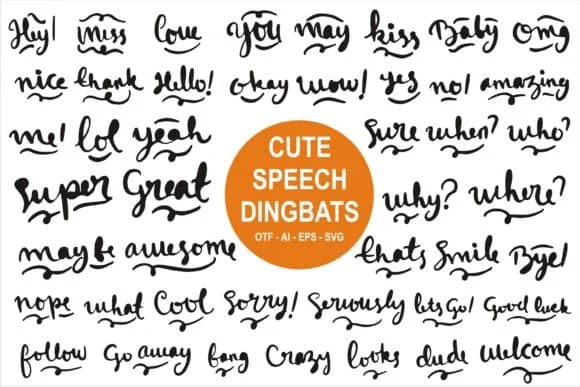
1 / 3About Cute Speech Font
Cute Speech is a hand-drawn dingbats collection centered on speech bubbles and quotation shapes, created by edywiyonopp. The letterforms carry a sketched, organic quality with natural curves and uneven edges that feel more personal than templated symbols. You get playful symbol characters rather than refined geometric ornaments, which changes how the font works in practice. That informal hand-drawn style is the whole point: it signals warmth rather than polish.
These kinds of dingbats solve specific typographic problems that come up regularly. Podcast cover art needs custom bubble shapes for dialogue callouts, so Cute Speech fits there naturally. Wedding invitation suites often call for distinctive quotation marks and accent shapes to frame vows or guest messages, and this font delivers that voice. Etsy product labels benefit from hand-drawn ornaments that signal indie craft, while DIY signage and small-batch packaging labels use these glyphs to add character without needing custom illustration work.
The font suits designers building pieces that prioritize warmth and personality over sterile precision. If you work with print-on-demand platforms or hand-lettered design, you'll find consistent symbol support for your creative layouts. Grab it from Creative Fabrica to license and integrate into your next project.
Style & Use Cases
- Overall Style
- Iconographic, Fonts
- Use Case
- Icons, Accents
- Ideal For
- ornaments, bullets, and decorative flourishes
- Pairs With
- any text font
How to Install Cute Speech Font
Step-by-step instructions for every platform
- 1Download the Cute Speech font file (.ttf or .otf).
- 2Locate the downloaded file in your Downloads folder.
- 3Right-click the font file.
- 4Select "Install" to install for the current user, or "Install for all users" to make it available system-wide.
- 5Cute Speech is now available in Word, Photoshop, Illustrator, and all other apps.
More by edywiyonopp
View all →
Browse fonts by theme
Curated collections →Saw a font in a picture? Identify any font from an image with our free Font Finder.
More Dingbats Fonts
Browse all →







What pairs well with Cute Speech Font?
Cute Speech Font is a versatile dingbats font that works for both headings and body text. Pair it with a contrasting sans-serif or serif font to add visual interest and a clear distinction between titles and body copy.



Cute Speech Font
by edywiyonopp
Reviewed by the FontBoxDL team · Updated July 2026