
 1 / 8
1 / 8About Cute Ghost Font
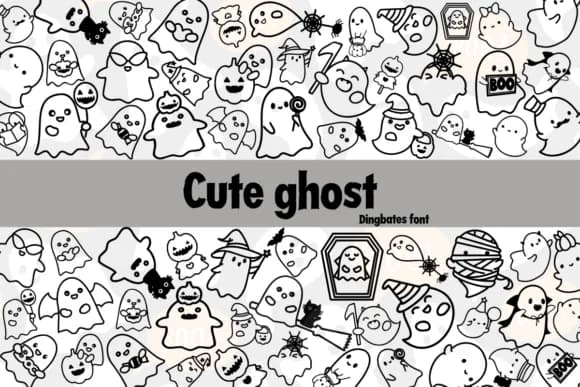
Picture yourself designing Halloween party invitations that actually feel playful instead of trying too hard to be scary. Cute Ghost by Chonada is a dingbat font built around charming ghost characters that land perfectly in that space between spooky and fun.
This collection works across a surprising range of seasonal applications. Halloween party invitations and greeting cards become more memorable with these characters as supporting elements. Etsy product labels for Halloween treats and decorations gain immediate visual warmth, while DIY craft projects, scrapbooking layouts, and costume tag designs all benefit from the playful personality these symbols bring to the work. Even haunted house signage and trick-or-treat event materials feel less generic when you're working with characters this deliberately designed and not overwrought.
Because this is a complete dingbat set, you're getting multiple ghost variations along with complementary symbols that pair naturally with your existing typefaces. The characters hold up cleanly whether you're setting them small or scaling them large, which means they work for everything from direct print work to layered paper cuts and vinyl projects. Grab it on Creative Fabrica and add this collection to your seasonal design toolkit.
Style & Use Cases
- Overall Style
- Iconographic, Ghost
- Use Case
- Icons, Accents
- Ideal For
- ornaments, bullets, and decorative flourishes
- Pairs With
- any text font
How to Install Cute Ghost Font
Step-by-step instructions for every platform
- 1Download the Cute Ghost font file (.ttf or .otf).
- 2Locate the downloaded file in your Downloads folder.
- 3Right-click the font file.
- 4Select "Install" to install for the current user, or "Install for all users" to make it available system-wide.
- 5Cute Ghost is now available in Word, Photoshop, Illustrator, and all other apps.




Browse fonts by theme
Curated collections →Saw a font in a picture? Identify any font from an image with our free Font Finder.
More Dingbats Fonts
Browse all →







What pairs well with Cute Ghost Font?
Cute Ghost Font is a versatile dingbats font that works for both headings and body text. Pair it with a contrasting sans-serif or serif font to add visual interest and a clear distinction between titles and body copy.



Cute Ghost Font
by Chonada
Reviewed by the FontBoxDL team · Updated July 2026