 Firefox
 1 / 8
1 / 8About Cute Flower Font
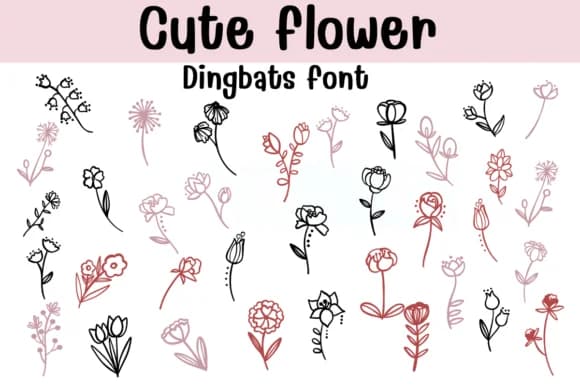
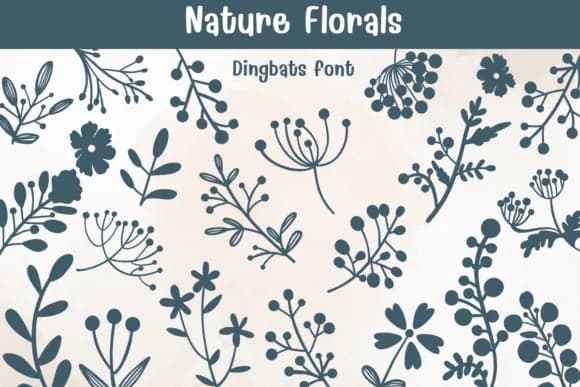
You're designing wedding invitation suites and need individual floral elements that feel hand-made rather than templated. Cute Flower, Sontaya's dingbat collection, solves this with stems, blooms, buds, and leaf shapes rendered in soft line work and retro styling. The characters work equally well as focal points at large sizes or as scattered accents woven throughout your layouts. This flexibility comes from thoughtful spacing and consistent design language across the entire set.
These dingbats shine when building botanical pattern backgrounds for product labels, creating gift wrap designs, or composing illustrated greeting cards. Each flower maintains clarity at all sizes, and you have enough style variation to layer multiple characters without obvious repetition. Built-in alternates and multiple stem styles let you compose flexibly. Available in both OTF and TTF formats, with versions optimized for Procreate and Affinity apps, so you won't hit compatibility snags whether you work digitally or traditionally.
The retro energy throughout keeps designs from tipping into saccharine territory. If you're tackling DIY craft projects, spring seasonal campaigns, or nature-themed branding work, having this depth of botanical marks ready to hand saves both time and creative friction. Pick up Cute Flower from Creative Fabrica and you'll have a toolkit that works across multiple project types.
Style & Use Cases
- Overall Style
- Iconographic, Fonts
- Use Case
- Icons, Accents
- Ideal For
- ornaments, bullets, and decorative flourishes
- Pairs With
- any text font
How to Install Cute Flower Font
Step-by-step instructions for every platform
- 1Download the Cute Flower font file (.ttf or .otf).
- 2Locate the downloaded file in your Downloads folder.
- 3Right-click the font file.
- 4Select "Install" to install for the current user, or "Install for all users" to make it available system-wide.
- 5Cute Flower is now available in Word, Photoshop, Illustrator, and all other apps.
Browse fonts by theme
Curated collections →Saw a font in a picture? Identify any font from an image with our free Font Finder.
More Dingbats Fonts
Browse all →







What pairs well with Cute Flower Font?
Cute Flower Font is a versatile dingbats font that works for both headings and body text. Pair it with a contrasting sans-serif or serif font to add visual interest and a clear distinction between titles and body copy.



Cute Flower Font
by Sontaya
Reviewed by the FontBoxDL team · Updated July 2026