
 1 / 8
1 / 8About Cute Fashion Font
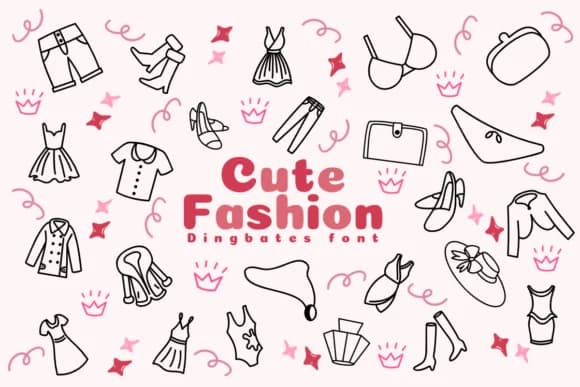
Cute Fashion by Chonada is a dingbat font that transforms basic fashion sketches into a functional visual system. Rather than generic clip-art symbols, each icon captures real detail and personality from actual garments and accessories. The collection includes dresses, shoes, bags, jeans, boots, skirts, sunglasses, and more, all rendered in a playful cartoon style that genuinely feels hand-drawn rather than algorithmic.
This font shines for boutique fashion label designs where you need standalone graphics for product tags and packaging. It works beautifully for DIY styling guides and lookbook covers, indie online shop banners and product pages, or personal fashion blog graphics and newsletters for style enthusiasts. Small clothing brands benefit immensely from having a cohesive icon set that maintains visual consistency across social feeds, email campaigns, storefronts, and promotional graphics without feeling corporate or mass-produced.
The full collection gives you breadth to mix and match icons across different project types. Use them in mood boards, seasonal sale graphics, or greeting cards for fashion lovers. These symbols communicate style and personality with almost no effort. Get Cute Fashion on Creative Fabrica and add visual personality to all your fashion graphics.
Style & Use Cases
- Overall Style
- Iconographic, Doodle
- Use Case
- Icons, Accents
- Ideal For
- ornaments, bullets, and decorative flourishes
- Pairs With
- any text font
How to Install Cute Fashion Font
Step-by-step instructions for every platform
- 1Download the Cute Fashion font file (.ttf or .otf).
- 2Locate the downloaded file in your Downloads folder.
- 3Right-click the font file.
- 4Select "Install" to install for the current user, or "Install for all users" to make it available system-wide.
- 5Cute Fashion is now available in Word, Photoshop, Illustrator, and all other apps.




Browse fonts by theme
Curated collections →Saw a font in a picture? Identify any font from an image with our free Font Finder.
More Dingbats Fonts
Browse all →







What pairs well with Cute Fashion Font?
Cute Fashion Font is a versatile dingbats font that works for both headings and body text. Pair it with a contrasting sans-serif or serif font to add visual interest and a clear distinction between titles and body copy.



Cute Fashion Font
by Chonada
Reviewed by the FontBoxDL team · Updated July 2026