 Firefox
 1 / 8
1 / 8Loading font…
About Cute Element Font
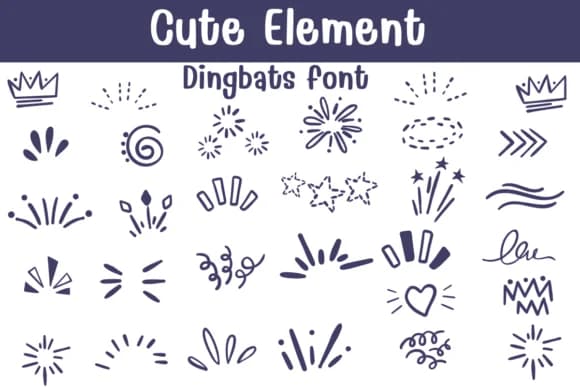
You're putting together a greeting card suite and need those little sparkly flourishes and heart icons that make handmade designs feel personal, not pulled from a template library. Cute Element by Sontaya is a dingbats collection built for this exact job: a curated set of hand-drawn doodles, crowns, balloons, stars, bursts, and decorative borders that work as accents throughout a layout. Available in both OTF and TTF formats, the glyphs render cleanly in Procreate, Affinity Designer, and Affinity Photo.
This font shines in hand-lettered scrapbook layouts, where the cartoon-style dingbat elements add visual interest without overwhelming your core typography. Etsy sellers rely on these dingbats for custom product label backgrounds and DIY sticker sheets; crafters paste them into bullet journal pages to mark mood, time, or milestone moments. The outline versions let you fill them in, which opens creative possibilities for custom merchandise designs, children's coloring books, or hand-printed apparel projects.
The collection carries enough visual weight and variety to anchor a focal point or scatter as texture across a piece. Each icon feels intentional, not random. Find Cute Element on Creative Fabrica and start layering those little flourishes into your work.
Style & Use Cases
- Overall Style
- Iconographic, Fonts
- Use Case
- Icons, Accents
- Ideal For
- ornaments, bullets, and decorative flourishes
- Pairs With
- any text font
How to Install Cute Element Font
Step-by-step instructions for every platform
- 1Download the Cute Element font file (.ttf or .otf).
- 2Locate the downloaded file in your Downloads folder.
- 3Right-click the font file.
- 4Select "Install" to install for the current user, or "Install for all users" to make it available system-wide.
- 5Cute Element is now available in Word, Photoshop, Illustrator, and all other apps.
Browse fonts by theme
Curated collections →Saw a font in a picture? Identify any font from an image with our free Font Finder.
More Dingbats Fonts
Browse all →







What pairs well with Cute Element Font?
Cute Element Font is a versatile dingbats font that works for both headings and body text. Pair it with a contrasting sans-serif or serif font to add visual interest and a clear distinction between titles and body copy.



Cute Element Font
by Sontaya
Reviewed by the FontBoxDL team · Updated October 2026