 Firefox
 1 / 8
1 / 8About Cute Doodle Font
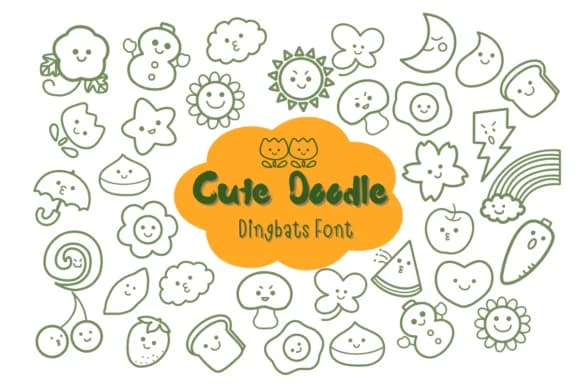
You're piecing together a vintage scrapbook layout and need decorative symbols that feel authentically retro. Cute Doodle, designed by Nun Sukhwan, delivers exactly that: a collection of handcrafted doodles and playful icons with a groovy 70s sensibility. This dingbats font works wonderfully for retro scrapbook pages, vintage record label artwork, hippie-themed event posters, and groovy greeting card accents. Each symbol has the sketchy, hand-drawn quality of something you'd find in a 1970s craft book, with just enough quirk to feel genuine rather than commercially polished.
The font includes a truly comprehensive range of doodle shapes and ornamental icons that hold their personality at any size. You'll find these symbols especially useful for retro book covers, boho gift tags, vintage invitations, and hand-lettered packaging designs. They bring authentic character to every visual layer, offering enough variety that you can build rich texture without hunting for supplementary fonts. Scrapbookers, product designers, and craft makers value having this collection in one place, since you get borders, objects, and ornamental accents in a single download. The doodles work especially well at larger sizes where their hand-sketched details become most prominent. Grab it from Creative Fabrica and start bringing that vintage groove to your designs.
Style & Use Cases
- Overall Style
- Iconographic, Retro
- Use Case
- Icons, Accents
- Ideal For
- ornaments, bullets, and decorative flourishes
- Pairs With
- any text font
How to Install Cute Doodle Font
Step-by-step instructions for every platform
- 1Download the Cute Doodle font file (.ttf or .otf).
- 2Locate the downloaded file in your Downloads folder.
- 3Right-click the font file.
- 4Select "Install" to install for the current user, or "Install for all users" to make it available system-wide.
- 5Cute Doodle is now available in Word, Photoshop, Illustrator, and all other apps.
More by Nun Sukhwan
View all →



Browse fonts by theme
Curated collections →Saw a font in a picture? Identify any font from an image with our free Font Finder.
More Dingbats Fonts
Browse all →







What pairs well with Cute Doodle Font?
Cute Doodle Font is a versatile dingbats font that works for both headings and body text. Pair it with a contrasting sans-serif or serif font to add visual interest and a clear distinction between titles and body copy.



Cute Doodle Font
by Nun Sukhwan
Reviewed by the FontBoxDL team · Updated July 2026