 Firefox
 1 / 8
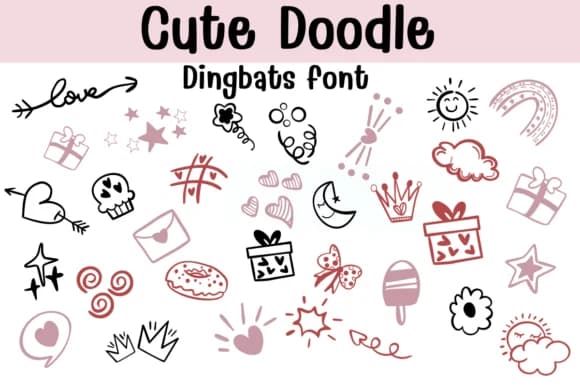
1 / 8About Cute Doodle Font
Sontaya's Cute Doodle is built on loose, bouncy linework that sits somewhere between illustration and graphic symbol work. Each glyph in this dingbats collection captures the energy of pen-on-paper doodling: hearts with real character, stars that feel hand-placed, candy illustrations, crowns, and dozens of small shapes that read as genuine sketches rather than digital constructs. The outline strokes and varying line weights give the entire set a playful immediacy that comes through even at smaller scales.
This font shines in applications where that hand-drawn charm genuinely matters. Use it for building digital sticker packs that sell on Etsy, designing layouts across planner spreads and scrapbooking pages, or assembling illustration-heavy greeting cards. The collection also works beautifully for teacher reward stickers, DIY banner and sign lettering, or even product label design where a charming, approachable visual would strengthen a brand. The OTF and TTF formats play well with Procreate, Affinity Designer, and Affinity Photo, giving you flexibility across desktop and tablet workflows.
The font suits anyone working on projects that lean handmade rather than polished. Design work for kids, indie product branding, and charming DIY endeavors all benefit from this symbol set's warmth and visual coherence. Grab Cute Doodle on Creative Fabrica to start building with it.
Style & Use Cases
- Overall Style
- Iconographic, Fonts
- Use Case
- Icons, Accents
- Ideal For
- ornaments, bullets, and decorative flourishes
- Pairs With
- any text font
How to Install Cute Doodle Font
Step-by-step instructions for every platform
- 1Download the Cute Doodle font file (.ttf or .otf).
- 2Locate the downloaded file in your Downloads folder.
- 3Right-click the font file.
- 4Select "Install" to install for the current user, or "Install for all users" to make it available system-wide.
- 5Cute Doodle is now available in Word, Photoshop, Illustrator, and all other apps.
Browse fonts by theme
Curated collections →Saw a font in a picture? Identify any font from an image with our free Font Finder.
More Dingbats Fonts
Browse all →







What pairs well with Cute Doodle Font?
Cute Doodle Font is a versatile dingbats font that works for both headings and body text. Pair it with a contrasting sans-serif or serif font to add visual interest and a clear distinction between titles and body copy.



Cute Doodle Font
by Sontaya
Reviewed by the FontBoxDL team · Updated June 2026