 Firefox
 1 / 3
1 / 3About Cruxially Font
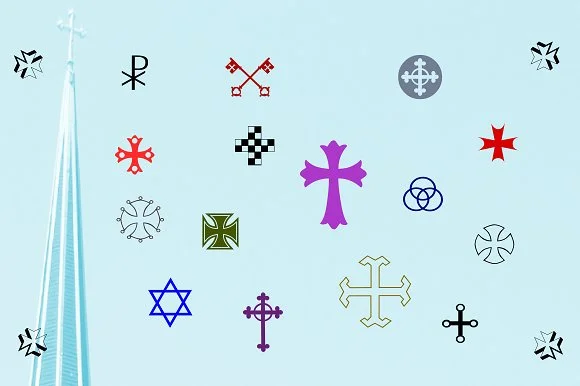
Cruxially by Proportional Lime is a comprehensive dingbat collection rooted in the visual language of global faith traditions. With nearly 500 glyphs on board, the font delivers far more than routine cross variations, though that symbol appears in abundant and inventive forms throughout. You'll find religious iconography spanning multiple belief systems, making this a valuable resource for designers who need authentic spiritual imagery without resorting to the same tired references that everyone else relies on.
The real value emerges when you start composing with clear intent. Having 500 glyphs means you're not stuck repeating the same symbols across a single layout. You can layer crosses with complementary religious marks to build original compositions that read as intentional and cohesive rather than plucked at random. This breadth makes Cruxially particularly useful for church bulletin covers, baptism and christening invitations, interfaith educational materials, and faith community event signage. Designers tackling these projects typically hit a wall trying to source enough variety without sacrificing visual authenticity or that handpicked quality.
Grab Cruxially from Creative Fabrica and start mining that glyph collection for your next spiritual design project.
Style & Use Cases
- Overall Style
- Iconographic
- Use Case
- Icons, Accents
- Ideal For
- ornaments, bullets, and decorative flourishes
- Pairs With
- any text font
How to Install Cruxially Font
Step-by-step instructions for every platform
- 1Download the Cruxially font file (.ttf or .otf).
- 2Locate the downloaded file in your Downloads folder.
- 3Right-click the font file.
- 4Select "Install" to install for the current user, or "Install for all users" to make it available system-wide.
- 5Cruxially is now available in Word, Photoshop, Illustrator, and all other apps.
More by Proportional Lime
View all →
Browse fonts by theme
Curated collections →Saw a font in a picture? Identify any font from an image with our free Font Finder.
More Dingbats Fonts
Browse all →







What pairs well with Cruxially Font?
Cruxially Font is a versatile dingbats font that works for both headings and body text. Pair it with a contrasting sans-serif or serif font to add visual interest and a clear distinction between titles and body copy.




Cruxially Font
Reviewed by the FontBoxDL team · Updated August 2026