 Firefox
 1 / 5
1 / 5About Crosses Font
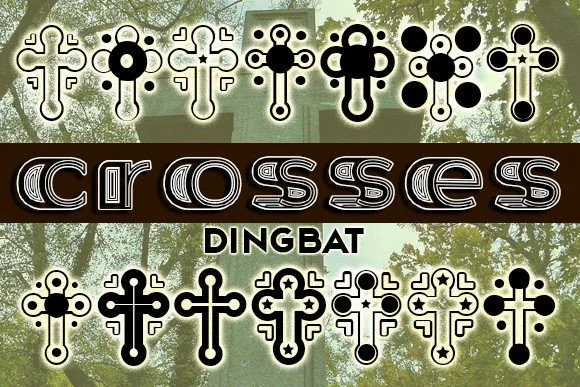
A designer laying out funeral programs needs symbols that convey quiet reverence without melodrama. Crosses, created by Vladimir Nikolic, is a dingbat font built precisely for that kind of sensitive, considered work. Each character carries clean geometry and careful weight calibration, making these marks work equally well as ornamental borders framing text or as standalone decorative elements that help anchor a composition.
The font earns its place across funeral programs and memorial card suites, where traditional symbolism still matters deeply to the people viewing the design. It works just as effectively for gothic event posters, concert merchandise graphics, album artwork, and occult-themed branding where clean bold symbols read as deliberate rather than gimmicky. Projects in these spaces benefit from symbols that don't apologize for themselves. The consistent stroke weight across all characters means these marks perform well whether used as small accent details or scaled large for dramatic poster applications, maintaining both clarity and visual presence at either extreme.
What sets Crosses apart is its essential restraint. These shapes don't pursue ornament or flourish; instead, they sit on pure geometry that speaks through directness and simplicity. Grab it from Creative Fabrica to bring honest, capable symbolism into your next project.
Style & Use Cases
- Overall Style
- Iconographic, Crosses
- Use Case
- Icons, Accents
- Ideal For
- ornaments, bullets, and decorative flourishes
- Pairs With
- any text font
How to Install Crosses Font
Step-by-step instructions for every platform
- 1Download the Crosses font file (.ttf or .otf).
- 2Locate the downloaded file in your Downloads folder.
- 3Right-click the font file.
- 4Select "Install" to install for the current user, or "Install for all users" to make it available system-wide.
- 5Crosses is now available in Word, Photoshop, Illustrator, and all other apps.
More by vladimirnikolic
View all →


Browse fonts by theme
Curated collections →Saw a font in a picture? Identify any font from an image with our free Font Finder.
More Dingbats Fonts
Browse all →







What pairs well with Crosses Font?
Crosses Font is a versatile dingbats font that works for both headings and body text. Pair it with a contrasting sans-serif or serif font to add visual interest and a clear distinction between titles and body copy.




Crosses Font
Reviewed by the FontBoxDL team · Updated July 2026