 Firefox
 1 / 8
1 / 8About Crafter Tools Font
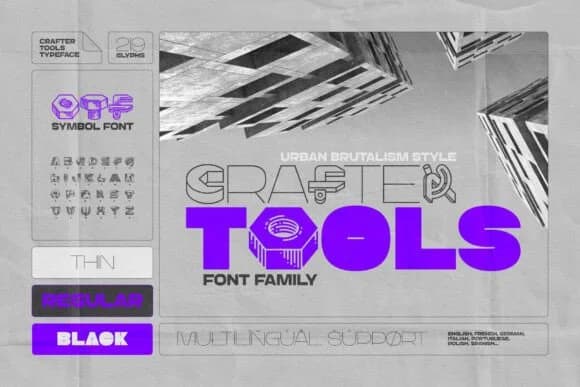
Crafter Tools, designed by Gleb Guralnyk, replaces conventional letterforms with the raw visual vocabulary of industrial tools and urban brutalism. Each character transforms into a stylized instrument, structural element, or builder's object, rendering text with a distinctly utilitarian sensibility that merges brutalist design language with grounded DIY craft culture.
The typeface arrives in three distinct weights (Thin, Regular, and Black), giving you fine-grained control over visual weight and impact across different layouts and hierarchies. Comprehensive multilingual character support ensures reliable performance on global projects and campaigns regardless of language. As a dingbat face, it reaches maximum impact in headlines, poster designs, and icon-based compositions where its bold visual vocabulary becomes the primary design driver rather than a supporting element. The font excels for workshop and maker space branding, brutalist poster campaigns, DIY craft product labels, vintage-inspired architectural graphics, and structural signage where intentional, unapologetic aesthetics strengthen the overall visual message.
The typeface best suits makers and designers whose work demands deliberate, unapologetically raw visual communication. Industrial brand identity, urban design collateral, and any project where tools and structure carry significant visual weight alongside function all benefit from Crafter Tools' authentically unpolished visual character. Grab it on Creative Fabrica via subscription.
Style & Use Cases
- Overall Style
- Iconographic, Urban
- Use Case
- Icons, Accents
- Ideal For
- ornaments, bullets, and decorative flourishes
- Pairs With
- any text font
How to Install Crafter Tools Font
Step-by-step instructions for every platform
- 1Download the Crafter Tools font file (.ttf or .otf).
- 2Locate the downloaded file in your Downloads folder.
- 3Right-click the font file.
- 4Select "Install" to install for the current user, or "Install for all users" to make it available system-wide.
- 5Crafter Tools is now available in Word, Photoshop, Illustrator, and all other apps.
More by Gleb Guralnyk
View all →

Browse fonts by theme
Curated collections →Saw a font in a picture? Identify any font from an image with our free Font Finder.
More Dingbats Fonts
Browse all →







What pairs well with Crafter Tools Font?
Crafter Tools Font is a versatile dingbats font that works for both headings and body text. Pair it with a contrasting sans-serif or serif font to add visual interest and a clear distinction between titles and body copy.



Crafter Tools Font
Reviewed by the FontBoxDL team · Updated June 2026