 Firefox
 1 / 6
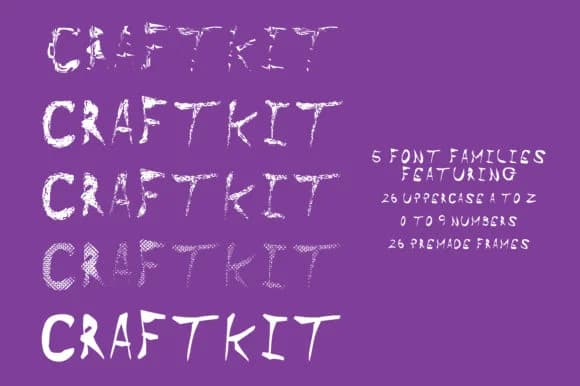
1 / 6About Craft Kit Font
Craft Kit by GraphicsBam Fonts is a versatile dingbat collection designed specifically for makers and artists who think in layers. With four distinct styles plus decorative frames included in one bundle, you get combinations that go well beyond what a single typeface typically offers. The frames function as standalone borders, pattern elements, or stack with the letterforms themselves to create dimensional effects that feel genuinely hand-assembled rather than digitally constructed.
This collection shines for wedding invitation suites where you need mix-and-match ornamental elements, DIY craft labels that demand a textured and imperfect aesthetic, custom scrapbooking layouts that benefit from visual depth, and Etsy product packaging that needs real personality. The rough, hand-drawn character works equally well for rustic paper goods, botanical print designs, and vinyl decal projects where thoughtful layering adds dimension and warmth. You could use frames as borders around text-based layouts, as standalone decorative fills, or layered over typography for added visual interest and texture. Because all four styles come bundled together, you can experiment with combinations within your projects without hunting down complementary typefaces elsewhere.
Grab Craft Kit from Creative Fabrica and see what these layered styles can do for your handmade designs.
Style & Use Cases
- Overall Style
- Iconographic, Craft
- Use Case
- Icons, Accents
- Ideal For
- ornaments, bullets, and decorative flourishes
- Pairs With
- any text font
How to Install Craft Kit Font
Step-by-step instructions for every platform
- 1Download the Craft Kit font file (.ttf or .otf).
- 2Locate the downloaded file in your Downloads folder.
- 3Right-click the font file.
- 4Select "Install" to install for the current user, or "Install for all users" to make it available system-wide.
- 5Craft Kit is now available in Word, Photoshop, Illustrator, and all other apps.
More by GraphicsBam Fonts
View all →
Browse fonts by theme
Curated collections →Saw a font in a picture? Identify any font from an image with our free Font Finder.
More Dingbats Fonts
Browse all →







What pairs well with Craft Kit Font?
Craft Kit Font is a versatile dingbats font that works for both headings and body text. Pair it with a contrasting sans-serif or serif font to add visual interest and a clear distinction between titles and body copy.



Craft Kit Font
Reviewed by the FontBoxDL team · Updated July 2026