 Firefox
 1 / 8
1 / 8Loading font…
About Costomer Font
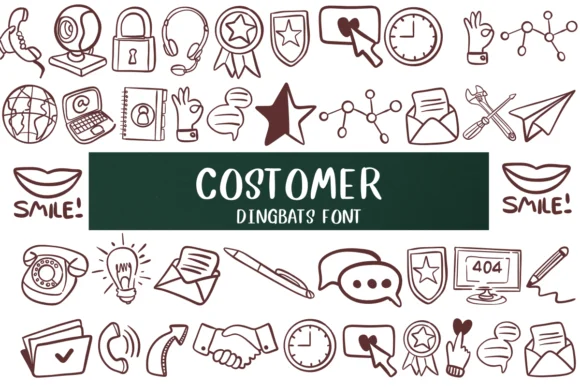
Costomer, designed by Nongyao, swaps out the standard alphabet for a set of business and communication symbols. Instead of letters, you work with clocks, phones, email icons, computers, and related workplace imagery rendered in a clean, moderately cartoonish style that reads clearly at any scale. The outline vector construction gives you room to colorize, layer, and repurpose marks across different projects without losing clarity or instant recognition.
The practical applications run surprisingly deep. Appointment reminder postcards, service business thank-you cards, team collaboration flowcharts, and internal consultation materials all benefit when you have dedicated icon glyphs that behave like actual type. You can fill the outlines with solid colors, gradients, or patterns depending on your layout direction and broader brand strategy. The result feels more intentional than scattered clip art, and faster to produce than hand-drawing symbols. Both OTF and TTF versions are included, so you can drop this into Adobe, Affinity, Procreate, and other design tools right away.
This font works best for designers and service-based businesses built on client communication. Costomer handles the functional, visual side of symbol communication without cluttering your layouts or adding unnecessary visual noise. Find it on Creative Fabrica and start building more intuitive client-facing collateral.
Style & Use Cases
- Overall Style
- Iconographic, Fonts
- Use Case
- Icons, Accents
- Ideal For
- ornaments, bullets, and decorative flourishes
- Pairs With
- any text font
How to Install Costomer Font
Step-by-step instructions for every platform
- 1Download the Costomer font file (.ttf or .otf).
- 2Locate the downloaded file in your Downloads folder.
- 3Right-click the font file.
- 4Select "Install" to install for the current user, or "Install for all users" to make it available system-wide.
- 5Costomer is now available in Word, Photoshop, Illustrator, and all other apps.




Browse fonts by theme
Curated collections →Saw a font in a picture? Identify any font from an image with our free Font Finder.
More Dingbats Fonts
Browse all →







What pairs well with Costomer Font?
Costomer Font is a versatile dingbats font that works for both headings and body text. Pair it with a contrasting sans-serif or serif font to add visual interest and a clear distinction between titles and body copy.




Costomer Font
by Nongyao
Reviewed by the FontBoxDL team · Updated October 2026