 Firefox
 1 / 7
1 / 7About Corn Pop Pack Font
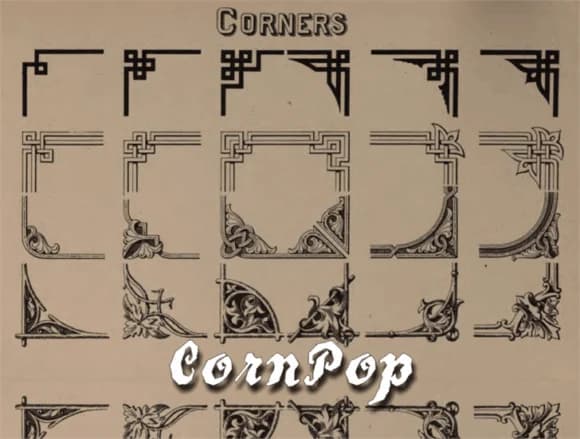
Corn Pop Pack by Intellecta Design is a collection of five ornamental dingbat fonts that blend vintage charm with retro sensibility. The set includes decorative cornucopias, geometric squares, and period-specific flourishes that give your work a polished, authentic feel. Each font draws from different historical eras, so you're not locked into one aesthetic direction or limited in scope.
What makes this family particularly useful is how it bridges multiple design languages at once. You get Art Deco geometry alongside art nouveau curves and Victorian ornamental elements in one cohesive package. Some fonts work best as corner decorations and border elements, while others can replace your entire glyph set for headings or special sections. The range of five distinct styles gives you flexibility to layer them for texture and visual depth, or commit to a single font if consistency and clarity matter more than variety.
Scrapbooking layouts, DIY craft embellishments, vintage greeting card suites, and retro packaging for artisan goods all benefit from what Corn Pop Pack delivers. Designers working on nostalgic branding projects or heritage-focused identity systems find that dingbats like these add real authority and character to their compositions. Pick up Corn Pop Pack on Creative Fabrica and start exploring how decorative ornaments transform the way you build visual hierarchy.
Style & Use Cases
- Overall Style
- Iconographic, Vintage
- Use Case
- Icons, Accents
- Ideal For
- ornaments, bullets, and decorative flourishes
- Pairs With
- any text font
How to Install Corn Pop Pack Font
Step-by-step instructions for every platform
- 1Download the Corn Pop Pack font file (.ttf or .otf).
- 2Locate the downloaded file in your Downloads folder.
- 3Right-click the font file.
- 4Select "Install" to install for the current user, or "Install for all users" to make it available system-wide.
- 5Corn Pop Pack is now available in Word, Photoshop, Illustrator, and all other apps.
More by Intellecta Design
View all →
Browse fonts by theme
Curated collections →Saw a font in a picture? Identify any font from an image with our free Font Finder.
More Dingbats Fonts
Browse all →







What pairs well with Corn Pop Pack Font?
Corn Pop Pack Font is a versatile dingbats font that works for both headings and body text. Pair it with a contrasting sans-serif or serif font to add visual interest and a clear distinction between titles and body copy.



Corn Pop Pack Font
Reviewed by the FontBoxDL team · Updated June 2026