 Firefox
 1 / 8
1 / 8About Cool Beans Dingbats Font
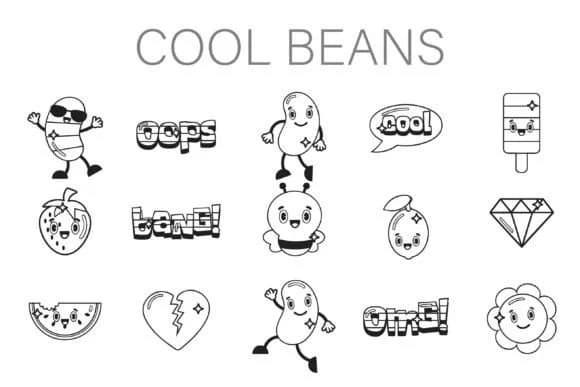
The letterforms burst with cheerful bean mascots, sparkling embellishments (diamonds, hearts, grinning citrus), and hand-lettered exclamations like "OMG" and "Bang" wrapped in three-dimensional speech bubbles. Cool Beans, designed by Illustration Ink, channels the unbridled energy of 90s pop culture and Y2K nostalgia. Each character carries a bright, whimsical charm that feels both retro and timeless.
This dingbat set opens doors for indie band merchandise labels, TikTok sticker pack designs, and retro-inspired zine layouts where personality matters more than polish. Podcast artwork with a nostalgic twist, vintage-style greeting cards that celebrate analog aesthetics, and casual social media graphics built on Gen-Z irony all benefit from what Cool Beans brings to the table. The clean linework ensures clarity even at small sizes, while the varied character set sustains visual interest across both compact applications and larger display compositions.
Perfect for visual work aimed at younger audiences and anyone genuinely drawn to kitsch and nostalgia, Cool Beans delivers carefree energy and playful confidence with each use. Build throwback merchandise, design digital stickers, or construct entire visual systems rooted in retro aesthetics. Grab it on Creative Fabrica to unlock a full toolkit of quirky symbols and distinctly 90s spirit.
Style & Use Cases
- Overall Style
- Iconographic, Dingbat Font
- Use Case
- Icons, Accents
- Ideal For
- ornaments, bullets, and decorative flourishes
- Pairs With
- any text font
How to Install Cool Beans Dingbats Font
Step-by-step instructions for every platform
- 1Download the Cool Beans Dingbats font file (.ttf or .otf).
- 2Locate the downloaded file in your Downloads folder.
- 3Right-click the font file.
- 4Select "Install" to install for the current user, or "Install for all users" to make it available system-wide.
- 5Cool Beans Dingbats is now available in Word, Photoshop, Illustrator, and all other apps.
More by Illustration Ink
View all →



Browse fonts by theme
Curated collections →Saw a font in a picture? Identify any font from an image with our free Font Finder.
More Dingbats Fonts
Browse all →







What pairs well with Cool Beans Dingbats Font?
Cool Beans Dingbats Font is a versatile dingbats font that works for both headings and body text. Pair it with a contrasting sans-serif or serif font to add visual interest and a clear distinction between titles and body copy.



Cool Beans Dingbats Font
Reviewed by the FontBoxDL team · Updated June 2026