 Firefox
 1 / 10
About Cocosignum Font
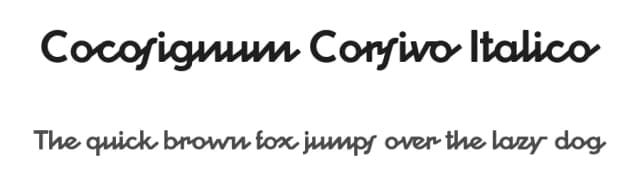
This typeface channels the bold, refined energy of 1930s Italian design and vintage propaganda aesthetics. Cocosignum by Zetafonts merges art deco swagger with geometric precision, delivering two entirely distinct personalities within a single family that adapts to whatever you're creating.
The uppercase commands serious graphic attention, drawing directly from that vintage poster tradition with its heavy strokes and monumental presence. The lowercase takes a completely different approach, especially in the Corsivo Italico version, where cursive forms sit firmly on geometric foundations and deliver a softer, more approachable character. With five weights distributed across both styles, you can adjust the visual intensity to match whatever a project demands, from subtle accent work to dominant display treatment. The typeface covers more than forty languages rendered in Latin, Greek, and Cyrillic, so international projects won't force you to hunt for supplementary fonts.
This works exceptionally well for art deco wedding invitation suites, boutique skincare packaging, vintage-style event signage and band posters, and luxury product labels where personality and craft drive the design. Pair it with a clean, minimal sans-serif for body text to keep the decorative forms as your primary visual focus. Find Cocosignum on Creative Fabrica and bring some real deco character to your next project.
Style & Use Cases
- Overall Style
- Bold, Distinctive
- Use Case
- Headlines, Posters
- Ideal For
- logos, packaging, and standout titles
- Pairs With
- a neutral sans-serif
How to Install Cocosignum Font
Step-by-step instructions for every platform
- 1Download the Cocosignum font file (.ttf or .otf).
- 2Locate the downloaded file in your Downloads folder.
- 3Right-click the font file.
- 4Select "Install" to install for the current user, or "Install for all users" to make it available system-wide.
- 5Cocosignum is now available in Word, Photoshop, Illustrator, and all other apps.
Browse fonts by theme
Curated collections →Saw a font in a picture? Identify any font from an image with our free Font Finder.
More Decorative Fonts
Browse all →







What pairs well with Cocosignum Font?
Cocosignum Font is a decorative font that shines as a display or heading face. Pair it with a clean sans-serif or serif font for body text — the contrast creates a clear hierarchy while the two styles stay balanced and easy to read.



Cocosignum Font
by Zetafonts
Reviewed by the FontBoxDL team · Updated June 2026