 Firefox
 1 / 8
1 / 8About Clucks and Peeps Font
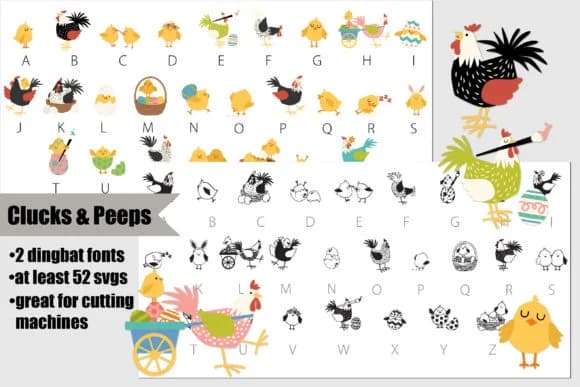
Clucks and Peeps by Illustration Ink brings a playful farmyard menagerie to your design toolkit. This dingbat collection gives you two ways to work: a crisp black and white version that works everywhere, plus a full-color SVG variant when you want bold, saturated imagery right from the font itself.
The set brings together roosters, hens, chicks, and easter-themed symbols drawn in a charming style. These work wonderfully for easter egg hunt materials, spring card designs, vinyl decal personalization, and craft file projects. As a font, you get infinite scalability, color customization in supported programs (Adobe Suite, Inkscape, and Silhouette Studio all work well), plus the freedom to integrate them without managing separate image files.
The color version uses OpenType SVG technology, so installation is straightforward: just add the .otf file to your system like any regular font. Non-compatible programs will display them as black outlines, but once you type in a supporting application, the full palette emerges. Check your software first to see if it renders color fonts on the page (not just in the font preview), and you'll unlock an easy way to add character detail to everything from nursery wall art to farm-stand signage. Get Clucks and Peeps on Creative Fabrica.
Style & Use Cases
- Overall Style
- Iconographic, Dingbat
- Use Case
- Icons, Accents
- Ideal For
- ornaments, bullets, and decorative flourishes
- Pairs With
- any text font
How to Install Clucks and Peeps Font
Step-by-step instructions for every platform
- 1Download the Clucks and Peeps font file (.ttf or .otf).
- 2Locate the downloaded file in your Downloads folder.
- 3Right-click the font file.
- 4Select "Install" to install for the current user, or "Install for all users" to make it available system-wide.
- 5Clucks and Peeps is now available in Word, Photoshop, Illustrator, and all other apps.
More by Illustration Ink
View all →



Browse fonts by theme
Curated collections →Saw a font in a picture? Identify any font from an image with our free Font Finder.
More Dingbats Fonts
Browse all →







What pairs well with Clucks and Peeps Font?
Clucks and Peeps Font is a versatile dingbats font that works for both headings and body text. Pair it with a contrasting sans-serif or serif font to add visual interest and a clear distinction between titles and body copy.



Clucks and Peeps Font
Reviewed by the FontBoxDL team · Updated July 2026