 Firefox
 1 / 8
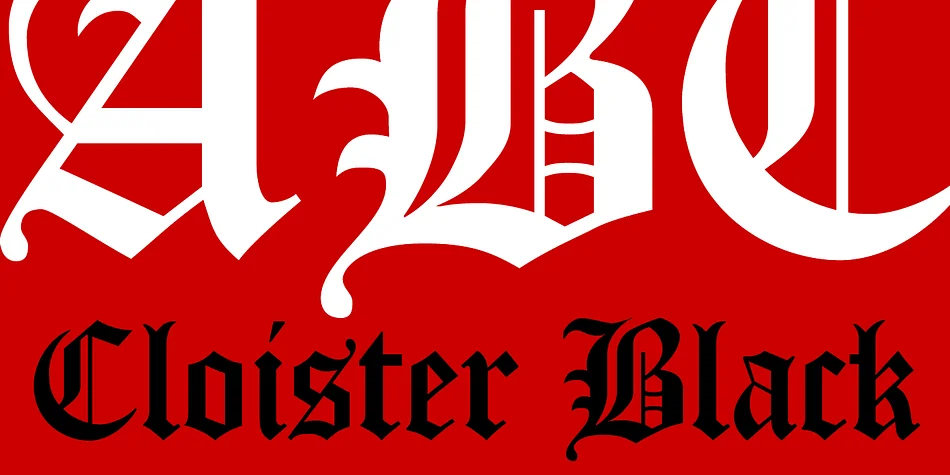
1 / 8About Cloister Black CT Font
When you're designing formal wedding invitations or creating a wine label that signals heritage and craft, Cloister Black CT from CastleType offers the blackletter presence you're looking for. This revival stays true to Morris Fuller Benton's 1904 original, maintaining the clean geometry and strong weight that made it distinctive without the ornamental excess that often weighs down gothic typefaces. The result reads formal and traditional without feeling overwrought or precious.
You'll find the font working beautifully for wedding invitation suites with period elegance, book jacket lettering that evokes historical authenticity, wine and spirits packaging demanding visual authority, and formal certificate or diploma designs. Beyond those applications, it performs equally well as masonry signage on heritage buildings, bookplate designs, menu headers, and anywhere your text needs to command attention through weight rather than decorative detail. Many designers reach for it when setting legal documents or formal correspondence where a touch of tradition matters.
At display sizes, the typeface maintains its structure without sacrificing readability, which means it works across both print production and digital contexts. The single weight is robust enough to anchor a full page or work as accent lettering. Grab Cloister Black CT from Creative Fabrica and add this historically rooted typeface to your collection.
Style & Use Cases
- Overall Style
- Ornate, Gothic
- Use Case
- Logos, Certificates
- Ideal For
- medieval themes, band merch, and tattoo lettering
- Pairs With
- a clean sans-serif for body text
How to Install Cloister Black CT Font
Step-by-step instructions for every platform
- 1Download the Cloister Black CT font file (.ttf or .otf).
- 2Locate the downloaded file in your Downloads folder.
- 3Right-click the font file.
- 4Select "Install" to install for the current user, or "Install for all users" to make it available system-wide.
- 5Cloister Black CT is now available in Word, Photoshop, Illustrator, and all other apps.
More by CastleType
View all →


Browse fonts by theme
Curated collections →Saw a font in a picture? Identify any font from an image with our free Font Finder.
More Blackletter Fonts
Browse all →
What pairs well with Cloister Black CT Font?
Cloister Black CT Font is a blackletter font that shines as a display or heading face. Pair it with a clean serif or sans-serif font for body text — the contrast creates a clear hierarchy while the two styles stay balanced and easy to read.




Cloister Black CT Font
by CastleType
Reviewed by the FontBoxDL team · Updated June 2026