 Firefox
 1 / 4
1 / 4About Classic Photoshop Shapes Font
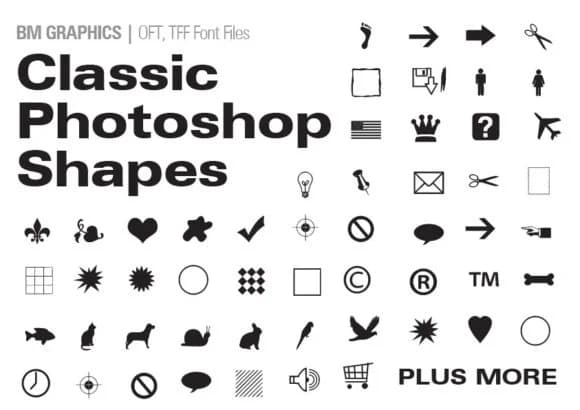
Classic Photoshop Shapes, created by GraphicsBam Fonts, flips the traditional font model on its head. This dingbat collection replaces letters with a library of geometric shapes, symbols, and decorative elements. Each keystroke pulls a distinct icon or embellishment rather than a standard character, giving you a visual toolkit right at your fingertips.
This collection really earns its place in sticker design for Etsy, where customers look for unique cut files and printable graphics. Craft label design gets an immediate boost when you add these shapes to jam jars, candles, or handmade cosmetic packaging. Wedding invitation suites benefit from layering these symbols as decorative borders and corner accents. Greeting card layouts, DIY poster backgrounds, and scrapbook embellishments all gain texture and visual weight from what's available here.
Designers who work with die-cut machines or run print-on-demand shops will find solid utility in this collection. The built-in variety means you can break up flat or minimalist designs without needing to source multiple fonts or hunt for additional graphic resources. Vinyl cutting projects, label makers, and digital graphics all benefit from having this shape resource on hand. Grab Classic Photoshop Shapes on Creative Fabrica to add geometric depth and visual texture to your work.
Style & Use Cases
- Overall Style
- Iconographic, Shapes
- Use Case
- Icons, Accents
- Ideal For
- ornaments, bullets, and decorative flourishes
- Pairs With
- any text font
How to Install Classic Photoshop Shapes Font
Step-by-step instructions for every platform
- 1Download the Classic Photoshop Shapes font file (.ttf or .otf).
- 2Locate the downloaded file in your Downloads folder.
- 3Right-click the font file.
- 4Select "Install" to install for the current user, or "Install for all users" to make it available system-wide.
- 5Classic Photoshop Shapes is now available in Word, Photoshop, Illustrator, and all other apps.
More by GraphicsBam Fonts
View all →
Browse fonts by theme
Curated collections →Saw a font in a picture? Identify any font from an image with our free Font Finder.
More Dingbats Fonts
Browse all →







What pairs well with Classic Photoshop Shapes Font?
Classic Photoshop Shapes Font is a versatile dingbats font that works for both headings and body text. Pair it with a contrasting sans-serif or serif font to add visual interest and a clear distinction between titles and body copy.



Classic Photoshop Shapes Font
Reviewed by the FontBoxDL team · Updated July 2026