 Firefox
 1 / 5
1 / 5About BM Graphics - Circles 2 Font
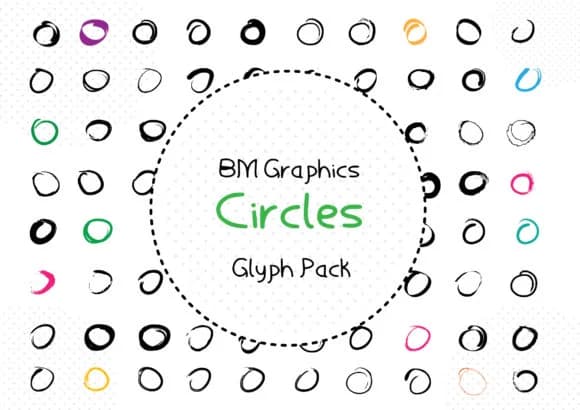
When you're layering a bullet journal spread or building out social media graphics, having a versatile symbol font is half the battle. BM Graphics - Circles 2, created by GraphicsBam Fonts, gives you a dingbats collection built entirely from circle shapes in different sizes and styles. Rather than hunting through multiple fonts for the right accent, you get a unified set where everything clicks together.
The circles range from solid forms to outlined rings, giving you real flexibility for layering and composition. Use them as bullet points in infographics, scatter them as pattern fills across backgrounds, layer them into badge designs, or build decorative elements for hand-lettered greeting cards. They work just as well in packaging label designs where you need cohesive, geometric accents that feel intentional rather than slapped on. Since these are built as a dingbats set, every circle variant is accessible from the keyboard, so you're not digging through alternate glyphs or swapping characters mid-project.
Having only circles to work with forces you to think creatively and intentionally about spacing and composition. Large or small, these shapes stack and layer without looking busy, and they read cleanly at smaller sizes for label text or intricate layout work. Grab it on Creative Fabrica and see how quickly it becomes a staple in your design toolkit.
Style & Use Cases
- Overall Style
- Iconographic, Pack
- Use Case
- Icons, Accents
- Ideal For
- ornaments, bullets, and decorative flourishes
- Pairs With
- any text font
How to Install BM Graphics - Circles 2 Font
Step-by-step instructions for every platform
- 1Download the BM Graphics - Circles 2 font file (.ttf or .otf).
- 2Locate the downloaded file in your Downloads folder.
- 3Right-click the font file.
- 4Select "Install" to install for the current user, or "Install for all users" to make it available system-wide.
- 5BM Graphics - Circles 2 is now available in Word, Photoshop, Illustrator, and all other apps.
More by GraphicsBam Fonts
View all →
Browse fonts by theme
Curated collections →Saw a font in a picture? Identify any font from an image with our free Font Finder.
More Dingbats Fonts
Browse all →







What pairs well with BM Graphics - Circles 2 Font?
BM Graphics - Circles 2 Font is a versatile dingbats font that works for both headings and body text. Pair it with a contrasting sans-serif or serif font to add visual interest and a clear distinction between titles and body copy.



BM Graphics - Circles 2 Font
Reviewed by the FontBoxDL team · Updated July 2026