 Firefox
 1 / 8
1 / 8About Christmas Snowflake Font
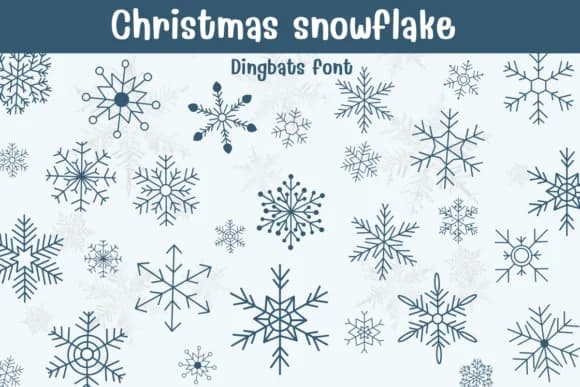
You're designing a suite of holiday greeting cards and need snowflake elements that feel sophisticated, not cookie-cutter. Christmas Snowflake, created by Sontaya, is a dingbat font where each character becomes a distinct snowflake symbol, rendered with geometric precision and balanced proportions that read beautifully whether large or small.
This font earns its place in projects like Christmas card sets, custom gift tag designs, Etsy product branding, and mug printing where you need authentic winter imagery that doesn't feel generic. The intricate linework paired with varied stroke weights gives each snowflake its own character without tipping into visual noise, so it layers cleanly over photographs or works as a standalone element on minimal backgrounds. Building a holiday label system, designing winter event invitations, and creating seasonal social graphics for a boutique shop all benefit from the glyph collection's range, which has enough variation to anchor multiple pieces without repetition.
What makes it practical is how well the detail renders at any scale, from tiny tags to large format printing. Head to Creative Fabrica and add it to your seasonal design toolkit.
Style & Use Cases
- Overall Style
- Iconographic, Diy
- Use Case
- Icons, Accents
- Ideal For
- ornaments, bullets, and decorative flourishes
- Pairs With
- any text font
How to Install Christmas Snowflake Font
Step-by-step instructions for every platform
- 1Download the Christmas Snowflake font file (.ttf or .otf).
- 2Locate the downloaded file in your Downloads folder.
- 3Right-click the font file.
- 4Select "Install" to install for the current user, or "Install for all users" to make it available system-wide.
- 5Christmas Snowflake is now available in Word, Photoshop, Illustrator, and all other apps.


Browse fonts by theme
Curated collections →Saw a font in a picture? Identify any font from an image with our free Font Finder.
More Dingbats Fonts
Browse all →







What pairs well with Christmas Snowflake Font?
Christmas Snowflake Font is a versatile dingbats font that works for both headings and body text. Pair it with a contrasting sans-serif or serif font to add visual interest and a clear distinction between titles and body copy.



Christmas Snowflake Font
by Sontaya
Reviewed by the FontBoxDL team · Updated June 2026