 Firefox
 1 / 8
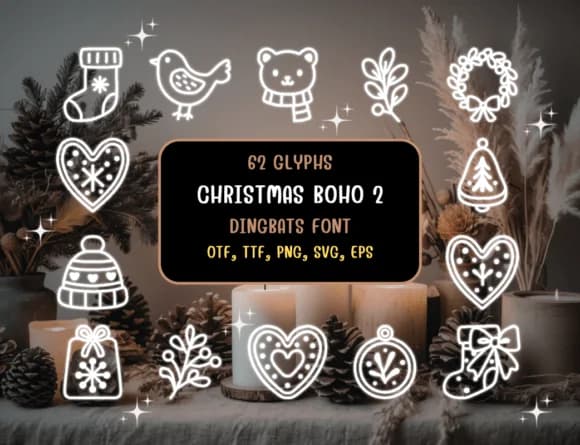
1 / 8About Christmas Boho 2 Font
Picture yourself designing holiday invitations with hand-drawn warmth throughout every detail. That's Christmas Boho 2, a dingbats font by Distiny4919 packed with 62 festive icons ready to use. Instead of hunting for separate graphics files, you simply type to layer wreaths, ornaments, gingerbread shapes, and cozy textile motifs directly into your layouts. The whole set carries an organic, sketchy quality that reads as intentional and warm rather than polished or corporate.
This particular font works beautifully for rustic holiday gift tags, minimalist Christmas printables, boho wedding invitation suites, and Scandinavian-style home décor prints. Since each character maps to a different illustration, you can mix and match to build custom patterns, sticker sheets, and festive social media icons without firing up a separate design tool. The hand-drawn linework stays readable whether you're setting it small on a greeting card or large on a printed banner or poster.
All 62 icons come in a single weight, making the font straightforward to implement across most projects and platforms you regularly use. You get everything required to bring cozy, organic holiday styling to your stationery, packaging, and digital work without extra effort. Grab Christmas Boho 2 from Creative Fabrica and start layering hand-drawn doodles into your seasonal designs.
Style & Use Cases
- Overall Style
- Iconographic, Boho Christmas
- Use Case
- Icons, Accents
- Ideal For
- ornaments, bullets, and decorative flourishes
- Pairs With
- any text font
How to Install Christmas Boho 2 Font
Step-by-step instructions for every platform
- 1Download the Christmas Boho 2 font file (.ttf or .otf).
- 2Locate the downloaded file in your Downloads folder.
- 3Right-click the font file.
- 4Select "Install" to install for the current user, or "Install for all users" to make it available system-wide.
- 5Christmas Boho 2 is now available in Word, Photoshop, Illustrator, and all other apps.
Browse fonts by theme
Curated collections →Saw a font in a picture? Identify any font from an image with our free Font Finder.
More Dingbats Fonts
Browse all →







What pairs well with Christmas Boho 2 Font?
Christmas Boho 2 Font is a versatile dingbats font that works for both headings and body text. Pair it with a contrasting sans-serif or serif font to add visual interest and a clear distinction between titles and body copy.



Christmas Boho 2 Font
by Distiny4919
Reviewed by the FontBoxDL team · Updated August 2026