 Firefox
 1 / 8
1 / 8About Celebratory Toast Font
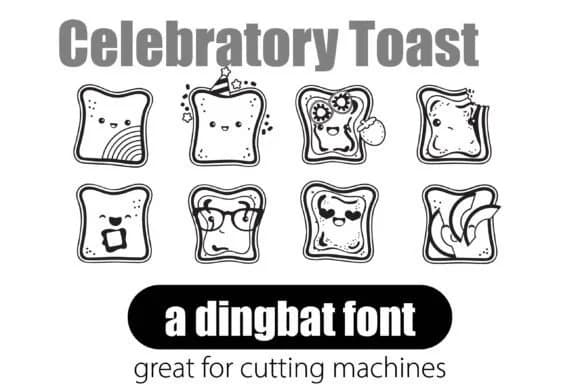
Celebratory Toast is a dingbat font designed by Illustration Ink around 26 playful toast and bread pictograms rendered in a kawaii style. Rather than hunting for icons or cutting images, you type letters to generate these cheerful graphics directly into your document. The consistent line weight and visual style create a unified appearance across print and digital projects.
This is the kind of font that speeds up real design work. Food bloggers reach for it to add personality to recipe post headers and social media graphics without managing separate image files. Bakery menus gain instant charm from toast motifs running along headers or margins. Birthday party invitations come alive with repeated bread elements that bring festive energy throughout the design. Even cafe signage and storefronts benefit from having scalable, coordinated bread illustrations built into the typeface itself. The font works across Adobe Creative Suite, Canva, and standard office software, so getting started is straightforward.
The main appeal is speed paired with flexibility. Since these are vector-quality graphics, your toasts stay sharp whether scaled tiny for a label or enormous across a poster. That makes the font genuinely useful for artisan bread brand identity work, wedding stationery with a food theme, greeting card suites, or any project where you need celebratory bread imagery at multiple scales without touching vector editing tools. Download it from Creative Fabrica and begin typing.
Style & Use Cases
- Overall Style
- Iconographic, Dingbat
- Use Case
- Icons, Accents
- Ideal For
- ornaments, bullets, and decorative flourishes
- Pairs With
- any text font
How to Install Celebratory Toast Font
Step-by-step instructions for every platform
- 1Download the Celebratory Toast font file (.ttf or .otf).
- 2Locate the downloaded file in your Downloads folder.
- 3Right-click the font file.
- 4Select "Install" to install for the current user, or "Install for all users" to make it available system-wide.
- 5Celebratory Toast is now available in Word, Photoshop, Illustrator, and all other apps.
More by Illustration Ink
View all →



Browse fonts by theme
Curated collections →Saw a font in a picture? Identify any font from an image with our free Font Finder.
More Dingbats Fonts
Browse all →







What pairs well with Celebratory Toast Font?
Celebratory Toast Font is a versatile dingbats font that works for both headings and body text. Pair it with a contrasting sans-serif or serif font to add visual interest and a clear distinction between titles and body copy.



Celebratory Toast Font
Reviewed by the FontBoxDL team · Updated June 2026