
 1 / 8
1 / 8About Cat Face Feelings Font
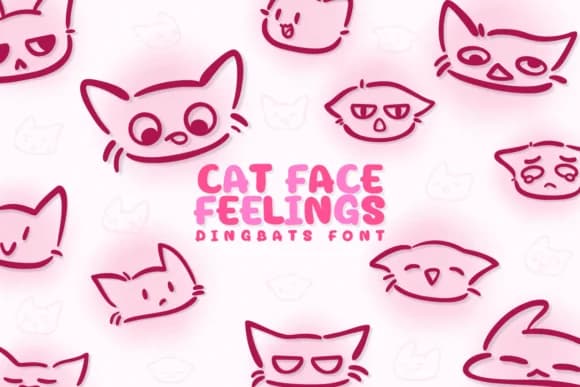
You're designing a greeting card for a friend who adores their cat, and you want to capture that mix of humor and affection that cat people understand. Cat Face Feelings by Chonada is a dingbats font built around feline expressions, each character a different mood or personality trait. The entire collection is rendered as vector illustrations, so every face stays sharp and readable from tiny stickers to poster-sized designs.
This font works well for pet greeting card suites where each expression can convey a different sentiment without words. Sticker sheet designers love it for creating emoticon-style packs, and children's book illustrators use the faces as chapter breaks and decorative elements. Small makers turn the characters into custom pet product packaging, adding personality to cat toy boxes or treat containers. Scrapbookers layer individual faces into mixed-media pages and DIY wall art, while social media creators use them as graphics that stand out in feeds and stories. The variety in the character set means you can shift tone or repeat a favorite expression depending on your project's mood.
You'll find every illustration stays crisp at any size, and the complete set offers enough variety to handle almost any emotion you want to convey. Pick up Cat Face Feelings on Creative Fabrica and bring some genuine cat character to your designs.
Style & Use Cases
- Overall Style
- Iconographic, Cat Face Feelings
- Use Case
- Icons, Accents
- Ideal For
- ornaments, bullets, and decorative flourishes
- Pairs With
- any text font
How to Install Cat Face Feelings Font
Step-by-step instructions for every platform
- 1Download the Cat Face Feelings font file (.ttf or .otf).
- 2Locate the downloaded file in your Downloads folder.
- 3Right-click the font file.
- 4Select "Install" to install for the current user, or "Install for all users" to make it available system-wide.
- 5Cat Face Feelings is now available in Word, Photoshop, Illustrator, and all other apps.




Browse fonts by theme
Curated collections →Saw a font in a picture? Identify any font from an image with our free Font Finder.
More Dingbats Fonts
Browse all →







What pairs well with Cat Face Feelings Font?
Cat Face Feelings Font is a versatile dingbats font that works for both headings and body text. Pair it with a contrasting sans-serif or serif font to add visual interest and a clear distinction between titles and body copy.



Cat Face Feelings Font
by Chonada
Reviewed by the FontBoxDL team · Updated June 2026