 Firefox
 1 / 6
1 / 6About Carrot Font
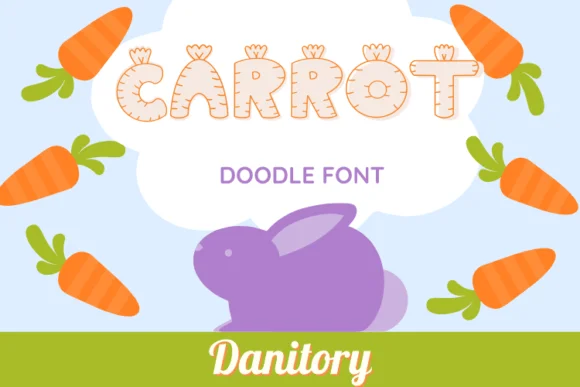
This whimsical dingbats font brims with vegetable-garden charm and playful energy. Carrot by danita.kukkai transforms each character into a cute veggie illustration, creating a cohesive visual language that feels both sweet and intentional. The font works because it commits fully to its theme without veering into overly cute or kitsch territory.
Where does this design really land? Think holiday menu cards that need personality and warmth, farmers market signage and produce labels that catch shoppers' eyes, classroom educational materials for teaching kids about eating well, seed packet designs and garden-themed invitations for spring events, or vegan and vegetarian brand packaging that wants character with genuine spirit. The kawaii-inspired glyph work gives each letter visual interest, making headlines pop and bringing subtle joy to layouts. Every character shares the same thoughtful craftsmanship, making the whole set feel intentionally designed rather than hastily assembled.
Pair Carrot with a minimal sans-serif typeface like Open Sans or Poppins for balanced layouts where typography and image can breathe together. That pairing lets the dingbats carry the visual weight and personality while your body copy stays clean, legible, and grounded. Find Carrot on Creative Fabrica and start bringing some genuine veggie-themed warmth to your next project.
Style & Use Cases
- Overall Style
- Iconographic, Carrot Font
- Use Case
- Icons, Accents
- Ideal For
- ornaments, bullets, and decorative flourishes
- Pairs With
- any text font
How to Install Carrot Font
Step-by-step instructions for every platform
- 1Download the Carrot font file (.ttf or .otf).
- 2Locate the downloaded file in your Downloads folder.
- 3Right-click the font file.
- 4Select "Install" to install for the current user, or "Install for all users" to make it available system-wide.
- 5Carrot is now available in Word, Photoshop, Illustrator, and all other apps.
More by danita.kukkai
View all →
Browse fonts by theme
Curated collections →Saw a font in a picture? Identify any font from an image with our free Font Finder.
More Dingbats Fonts
Browse all →







What pairs well with Carrot Font?
Carrot Font is a versatile dingbats font that works for both headings and body text. Pair it with a contrasting sans-serif or serif font to add visual interest and a clear distinction between titles and body copy.




Carrot Font
Reviewed by the FontBoxDL team · Updated July 2026