
 1 / 8
1 / 8About Candy Font
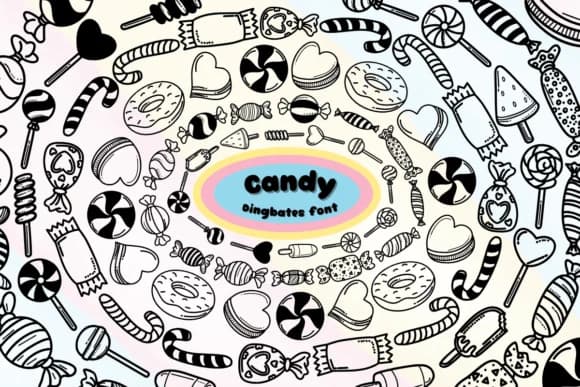
Candy, designed by Chonada, is a dingbats font that swaps traditional letterforms for striped, rounded candy-themed symbols. Each glyph carries a tactile, confectionery quality that reads as playful without tipping into pure cuteness. The striped detailing and rounded shapes create visual interest at multiple scales, whether displayed large or used as smaller decorative accents.
Where this font truly works is in projects that call for dessert-inspired or festive visual language. Wedding invitation suites gain dimension when Candy supplies decorative glyphs alongside serif type for body copy. Holiday card designs, boutique bakery packaging, and DIY craft stickers all benefit from its candy-colored, graphic character. Seasonal menus, party favor labels, and festive gift tags are natural applications where a touch of sweetness strengthens the overall aesthetic. The symbol library remains legible enough to work as functional icons while retaining that playful, confectionery personality.
This font suits designers creating holiday-themed projects, boutique candy brand identities, or anyone needing tactile, candy-flavored visual elements that stay intentional rather than saccharine. You'll find room to experiment across different scales and layout styles. Get Candy on Creative Fabrica and add some deliberate sweetness to your next creative direction.
Style & Use Cases
- Overall Style
- Iconographic, Striped
- Use Case
- Icons, Accents
- Ideal For
- ornaments, bullets, and decorative flourishes
- Pairs With
- any text font
How to Install Candy Font
Step-by-step instructions for every platform
- 1Download the Candy font file (.ttf or .otf).
- 2Locate the downloaded file in your Downloads folder.
- 3Right-click the font file.
- 4Select "Install" to install for the current user, or "Install for all users" to make it available system-wide.
- 5Candy is now available in Word, Photoshop, Illustrator, and all other apps.




Browse fonts by theme
Curated collections →Saw a font in a picture? Identify any font from an image with our free Font Finder.
More Dingbats Fonts
Browse all →







What pairs well with Candy Font?
Candy Font is a versatile dingbats font that works for both headings and body text. Pair it with a contrasting sans-serif or serif font to add visual interest and a clear distinction between titles and body copy.



Candy Font
by Chonada
Reviewed by the FontBoxDL team · Updated July 2026