 Firefox
 1 / 7
1 / 7About Calligraphia Latina Soft 2 Font
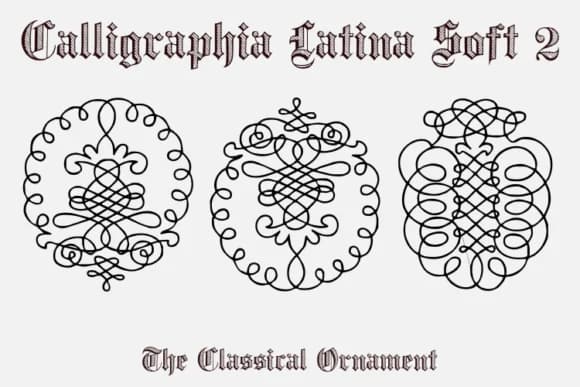
Calligraphia Latina Soft 2 by Intellecta Design draws from 18th-century French neoclassical penmanship, assembling ornaments that feel historically grounded yet genuinely useful for contemporary work. This isn't decoration for its own sake, but rather a collection of 52 carefully rendered glyphs built to stand alongside your typography rather than overwhelm it. The font excels in luxury applications where restraint and craft matter: wedding invitation suites, high-end brand packaging, formal menu cards, vintage certificate designs, and letterpress stationery projects where classical detail adds real measurable value to every composition.
The ornaments clearly carry that hand-finished quality you'd see in period letterpress work, so they read as authentic without feeling precious or overwrought. Scale them large for dramatic focal points or tuck them into corners and margins as delicate accents that frame other content beautifully. Designers building identity systems for boutique businesses, creating monogram compositions, or designing stationery systems often reach for collections exactly like this one. The clean, confident execution keeps these ornaments versatile enough to work whether you're composing layouts digitally or preparing files for actual letterpress production.
If your work values historical authenticity and classical detail over generic ornamentation, Calligraphia Latina Soft 2 on Creative Fabrica is worth exploring.
Style & Use Cases
- Overall Style
- Iconographic, Ornament Fonts
- Use Case
- Icons, Accents
- Ideal For
- ornaments, bullets, and decorative flourishes
- Pairs With
- any text font
How to Install Calligraphia Latina Soft 2 Font
Step-by-step instructions for every platform
- 1Download the Calligraphia Latina Soft 2 font file (.ttf or .otf).
- 2Locate the downloaded file in your Downloads folder.
- 3Right-click the font file.
- 4Select "Install" to install for the current user, or "Install for all users" to make it available system-wide.
- 5Calligraphia Latina Soft 2 is now available in Word, Photoshop, Illustrator, and all other apps.
More by Intellecta Design
View all →
Browse fonts by theme
Curated collections →Saw a font in a picture? Identify any font from an image with our free Font Finder.
More Dingbats Fonts
Browse all →







What pairs well with Calligraphia Latina Soft 2 Font?
Calligraphia Latina Soft 2 Font is a versatile dingbats font that works for both headings and body text. Pair it with a contrasting sans-serif or serif font to add visual interest and a clear distinction between titles and body copy.



Calligraphia Latina Soft 2 Font
Reviewed by the FontBoxDL team · Updated July 2026