 Firefox
 1 / 10
About Caboom Font
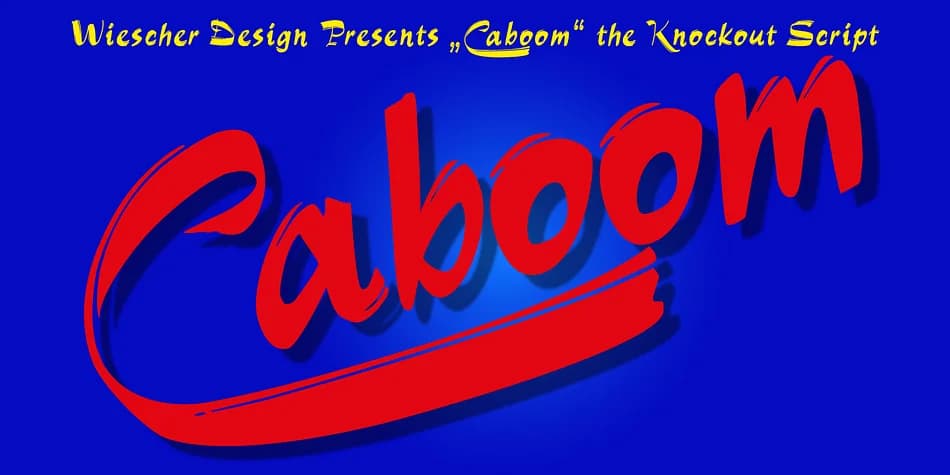
Picture a vintage movie poster for a 1960s French film, where the title needs to jump off the canvas with playful energy and personality. That's Caboom, a spirited script by Wiescher-Design that channels the kinetic joy of classic cinema into a typeface. The font family draws inspiration from that feeling of discovering something delightfully quirky and utterly charming, and it brings that same sense of spontaneity to your creative work.
Caboom shines brightest on theatrical event invitations, indie band posters, and playful packaging for boutique confectionery brands. The family gives you real flexibility: two full sets of uppercase and lowercase letters, a small caps variant, and uppercase forms with elegant underswings that add genuine flair when you need it most. You also get three alternate lowercase endings to choose from, plus two complete number sets, so you can customize the visual look to match your project's personality.
The liveliness that makes Caboom distinctive comes through especially well at large display sizes, where those alternates and swash options really shine. You're getting five complete fonts in one package, making it easy to layer, mix, and match for maximum creative impact. Grab it from Creative Fabrica and start bringing that energetic, joyfully unrefined spirit to your next design project.
Style & Use Cases
- Overall Style
- Elegant, Flowing
- Use Case
- Invitations, Branding
- Ideal For
- wedding stationery, greeting cards, and signatures
- Pairs With
- a simple uppercase sans
How to Install Caboom Font
Step-by-step instructions for every platform
- 1Download the Caboom font file (.ttf or .otf).
- 2Locate the downloaded file in your Downloads folder.
- 3Right-click the font file.
- 4Select "Install" to install for the current user, or "Install for all users" to make it available system-wide.
- 5Caboom is now available in Word, Photoshop, Illustrator, and all other apps.
More by Wiescher-Design
View all →
Browse fonts by theme
Curated collections →Saw a font in a picture? Identify any font from an image with our free Font Finder.
More Script Handwritten Fonts
Browse all →







What pairs well with Caboom Font?
Caboom Font is a script font that shines as a display or heading face. Pair it with a clean sans-serif or serif font for body text — the contrast creates a clear hierarchy while the two styles stay balanced and easy to read.



Caboom Font
Reviewed by the FontBoxDL team · Updated July 2026